


This article is relevant if you’re curious about what AI can do with your NetSuite data and would like a little help getting started.
TL;DR Summary
I suggest starting with one familiar question. Ask it in ChatGPT or Claude through a read-only MCP connection to NetSuite, then check the answer against a report you know. When you have access to Ask Oracle, try the same question there.
Background
The first time is easier when you know the business question. If you’ve used ChatGPT or Claude (is it now safe to assume everyone has?), you already know how to ask a question and refine it. A read-only connection lets you do that with familiar NetSuite data and gives you a feel for what Oracle is bringing into the application. Readers may be interested in my SuiteWorld 2026 assessment of NetSuite Next.
Connect ChatGPT or Claude to NetSuite
Think of Model Context Protocol (MCP) as a USB-C port for AI. It gives compatible AI clients a common way to discover data and call tools. NetSuite’s AI Connector Service provides the connection. The tools you expose and the role you use determine what the client can see and do. See the related document: NetSuite AI Connector Service FAQ.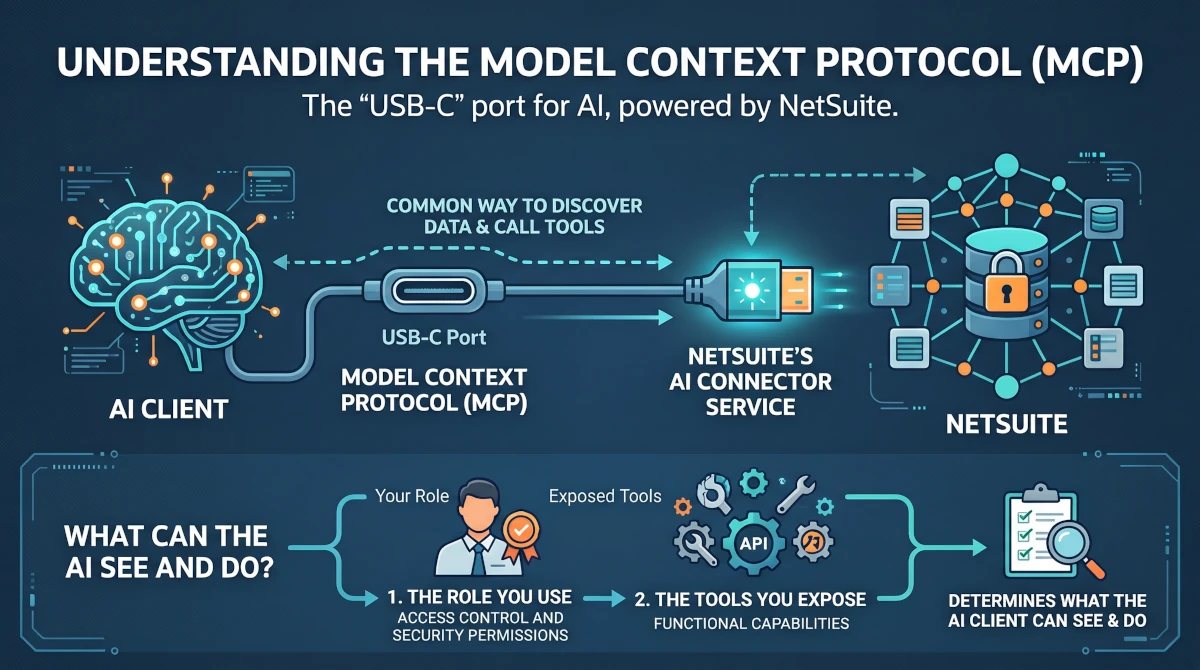
The chat client operates outside NetSuite and can call the tools you authorize. With write access, a misunderstood instruction could update the wrong record or trigger a downstream workflow. A read-only role gives you room to explore without worry. Ask your administrator to verify what the tools can read, confirm they cannot make changes, and review what information the external service receives. When you’re ready to try writing to NetSuite, use a sandbox. See the related document: Oracle’s MCP risks and controls.
The NetSuite Setup to Activate AI MCP Tools
If you’re a NetSuite user, ask your administrator to help you get connected. Here’s what they’ll set up.
- Define the business purpose and access scope: Name the pilot users and decide which records and subsidiaries they need.
- Enable the account features: The AI Connector Service requires Server SuiteScript and OAuth 2.0. Enable REST Web Services for the MCP Standard Tools SuiteApp. See: Get Started with the NetSuite AI Connector Service.
- Install the MCP Standard Tools SuiteApp: Oracle supplies tools for records, reports, saved searches, and SuiteQL. Start with the tools that serve the pilot. See: MCP Standard Tools SuiteApp.
- Assign a dedicated, read-only role: Use a non-Administrator role with MCP Server Connection, OAuth 2.0 Access Tokens, and the permissions required by the selected tools, including REST Web Services where required. Give the role view access to the business data in scope. Test that it can retrieve the intended records, that sensitive records are outside its reach, and that the exposed tools cannot make changes. Oracle’s tool permissions reference.
Connect the Chat Client and Test an Answer You Can Trust
For ChatGPT, start with the NetSuite plugin for ChatGPT. If your organization is configuring the MCP connection directly, see my article on ChatGPT setup troubleshooting notes.
For Claude, start with the NetSuite plugin for Claude and follow the Claude portion of our video walkthrough for connecting NetSuite to ChatGPT and Claude. Confirm that your plan and workspace support the connection.
Here’s a question you can try: “As of today, which open customer invoices for this subsidiary are more than 30 days past due? Show invoice numbers, due dates, and open balances by currency.” Pull up your A/R aging detail in NetSuite with the same date, subsidiary, and currency settings and see how the answers line up.
Ask Oracle Is the Conversational Foundation of NetSuite Next
At SuiteWorld 2026, I called this “Chat in the App.” Oracle is making Ask Oracle central to the Next experience and bringing some of its capabilities into the existing NetSuite interface. Where your account and role have access, run the same receivables question there. See how it feels to ask while you’re already working in NetSuite. Ask Oracle can use application context and works within the permissions of your current role. See: Oracle’s NetSuite 2026.2 overview. 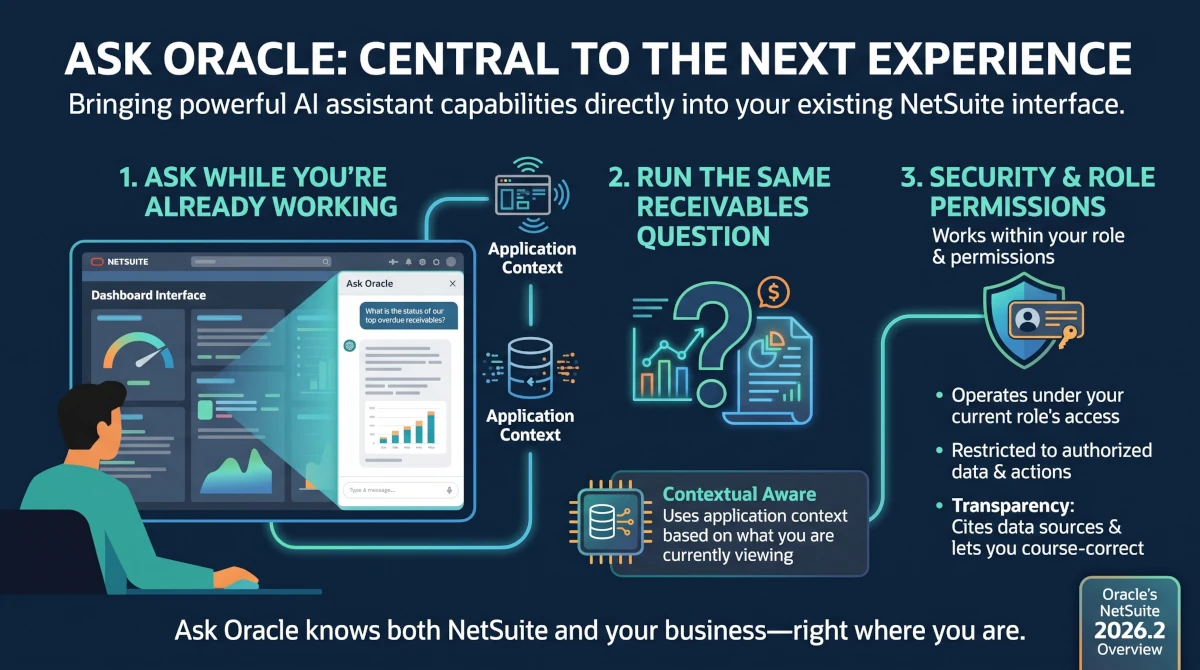
Making Your AI Usage Count
Tokens are the pieces of text a model processes or generates. When an external assistant pulls a large result set into a conversation, that data adds to what the model has to process. Usage limits and charges depend on the provider and plan. Oracle is bringing a consumption model into NetSuite through AI Units, a measure of the processing a task requires. Eligible licenses include pooled units, and customers can purchase more. Oracle’s estimates put a simple Ask Oracle question at about 10 units and a more involved research question at 50 to 200. See: Oracle’s AI Units FAQ. 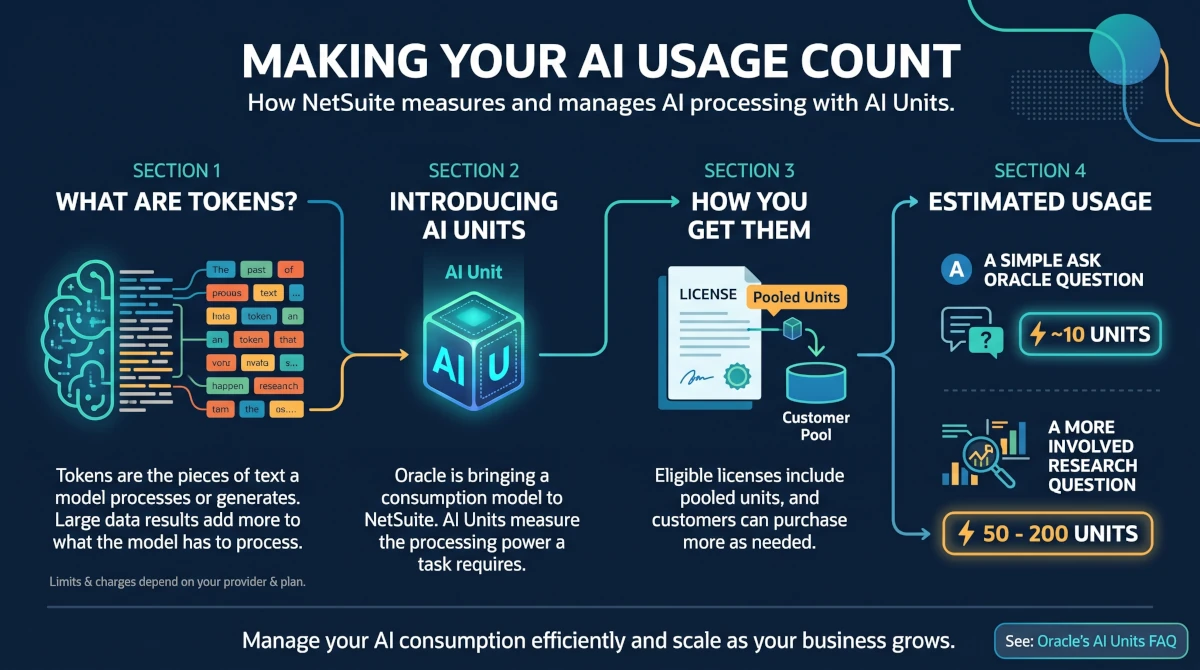
Go back to our 30-day receivables question. If you’re deciding who to call first, ask for the five largest open invoice balances more than 30 days past due for your subsidiary, in the currency you’re working in. Ask it to apply those filters in NetSuite before bringing the results into the chat. That keeps the data it processes focused on the calls you’re about to make. Meaning, it is valuable to narrow your request to make information more actionable. If you need the full aging picture, ask for it when the work calls for it. Your administrator can see how usage adds up under Setup > Company > AI Unit Usage. See: How Oracle calculates AI Unit usage.
Give People Room to Build
My colleague Chidi Okwudire described a client who used AI to prototype a better CRM experience in a NetSuite sandbox. The client, Richard, knew where field salespeople lost time, so he built a workspace where they could see opportunities, log calls inline, and review customer health based on invoice activity. NetSuite remained the system of record. After the prototype worked, he brought in Prolecto to review security, performance, and the implications of putting it into production. See the related article, How AI Helps Systems-Minded Business Users Build a Better Experience on NetSuite.
If the receivables example has you imagining a better collections screen, sketch it with AI. This is where the creativity explodes. Ask someone who makes those calls what they’d want in front of them. If the idea has promise, review the records, permissions, and tests before others rely on it.
Build Confidence in the Work
At Prolecto Resources, we start by listening to how people do the work and what they need to trust the answer. That understanding shapes the role, the tools, and the way we verify the result. When a useful experiment becomes a production candidate, we bring our NetSuite implementation experience and offer our accelerator templates to clients without a separate license charge.
If you found this article relevant, sign up for notifications for new articles. If you’d like help getting your team started with NetSuite AI, let’s have a conversation.