


The trial balance is a fundamental information sharing structure when working with tax accountants. NetSuite’s default trial balance is not well organized for tax work. It groups and sorts accounts in a peculiar fashion.
Fortunately, the NetSuite Report Writer is quite up to the task. Below are screen shots that can help you quickly get a clean trial balance that only your tax accountant will appreciate — and let’s hope it keeps your tax bill down so they do more important analysis work versus wasting time massaging data.

NetSuite Trial Balance Field Output
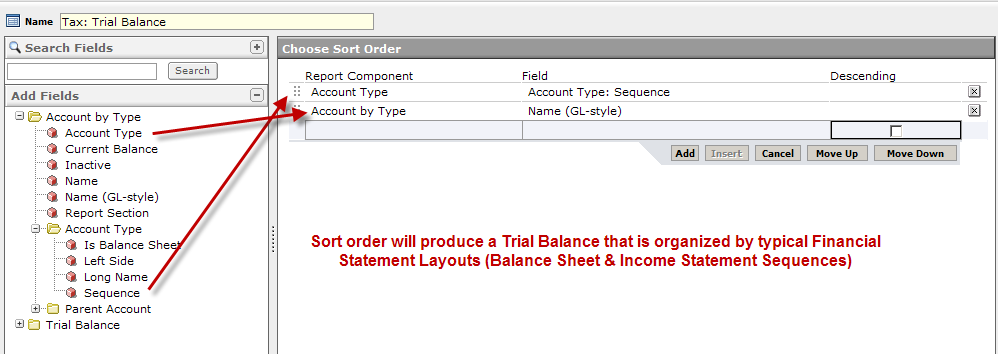
NetSuite Trial Balance Sort Sequence
.










Hi Marty – thanks for this helpful post. Is it possible to run a trial balance that shows multiple time periods, say last 6 months by month? Thanks, Rich
Hi Rich,
From what I can see, it appears you can take the standard NetSuite Trial Balance report and then use the Customize feature to add another “Amount” Column and then use the “Alternative Date Range” feature to specify a different date. My tests seem to show this works. But I have seen in other reports that the alternative date range has behaved somewhat funny which lead me to be careful to test that it works right for the use case.
Let me know what you find.
Marty
Hi Marty,
Can you tell me how to add beginning balance to Netsuite’s trial balance?
Thanks, Sandi
Hello Sandi,
Fundamentally, a beginning balance is simply the sum of the balances up to that date. That is straightforward to calculate. Can you share more what you are thinking of doing?
Marty
Hi Marty,
I’ve just come across Sandi’s question above, after searching the internet. I have exactly the same issue. For some accounts, such as “1000 – Checking”, the Trial Balance report for a particular date shows one amount but when you then click on that amount to drill down to the account detail, it shows a balance for that date which is different to the one shown on the Trial Balance report. The difference is the starting balance for the account, i.e. the balance shown at the very top of the general ledger for that account. I presume that’s a balance before any other transaction has ever been posted to that account. When calculating the balance, the General Ledger report includes that starting balance, but the Trial Balance report discards it. Any idea why?
That’s a very interesting question. Are you saying that the checking account was constituted with a balance that did not include some type of transaction? What I observe is that when entering an opening balance via the account setup, NetSuite will automatically create a journal entry and offset to an “Opening Balance” system account. That transaction would be included in a saved search roll up.
Thanks for the reply, Marty. I’m not sure how that balance ended up there. I’m using a SuiteCloud Developer Network “testdrive” account which was already set up with sample data when I joined SDN. When I look at the General Ledger report I see a balance of -3184 at the top, followed by an actual journal entry transaction for the opening balance of 150,000. However, in the balance column, that makes the running balance 146,816 on the date of the “opening balance” journal entry. I am developing using SuiteTalk and this balance of -3184 can be seen by calling getPostingTransactionSummary. It returns a PostingTransactionSummary with an amount of -3184 and a null period. If I do a transaction search to return all transactions, there is no transaction for that amount. I could find no documentation about what it means to get a posting transaction summary with a null period. I also couldn’t find any way to create a new account with such a balance.
Hello Kiltos,
Check to see if a period, or account, or something has been hidden or inactive. Weird things like this usually are explained by someone marking something inactive.
Marty
We are working on a Hyperion planning implementation for a customer who is also implementing netsuite. We are trying to load a monthly TB to the Planning application.
According to the netsuite team, it is not possible to get trial balance extracts without additional custom api/other tech solutions.
is this your experience?
Hi Shane,
We have worked with a client to generate Trial Balances via Saved Searches which can then be exposed with all of NetSuite’s platform. It is challenging because you simple don’t aggregate on account, yet you start there. You need to account for crossing fiscal periods and and other interesting things come up such as the cumulative translation adjustment account . Bottom line, we have all the algorithms after a fair amount of sweat.
If the data is only needed one time, then use NetSuite’s native Trial Balance report (not really programmable in the way a Saved Search can be exposed to the REST / SuiteScript API). Good luck!
Marty