


This article is relevant if you want to hide some buttons and other HTML elements on NetSuite forms.
Background
NetSuite’s point-and-click customization system is generally good for giving administrators the ability to change the NetSuite presentation layer. However, recently, a client came to us asking a simple question:
"How can I remove the buttons on the Invoice > Communication Sub Tab?  I want to remove:
Attach
Letter
PDF
Fax
Customize View"
Fortunately, I have experienced members on our team that have strong fundamental web and database development skills. Thus, they know how to answer these kinds of questions.
These specific sublist buttons are not available for removal via the point-and-click customization. You often can hide the entire tab — but many times, that is not what we want to do. We just need more refined control over the situation.
How to Hide NetSuite User Interface Elements
While NetSuite does not recommend you modify the user interface without using its built-in tools and libraries, there are times when we must take matters into our own hands. We must always remember that the NetSuite client presentation layer is (complex) HTML and thus we can use client-side JavasScript to get control. This kind of browser programming is called the Document Object Model (DOM) which provides the API layer to make HTML interactive. As such, all we need to is to know is a few key things:
- JQuery: NetSuite provides a reference to the JQuery add-in library by default. Thus it is convenient for DOM operations.
- HTML IDs: We need to know the IDs of the target HTML elements we want to manipulate.
- Script: We need to inject some client-side JavaScript into the HTML to get ultimate control.
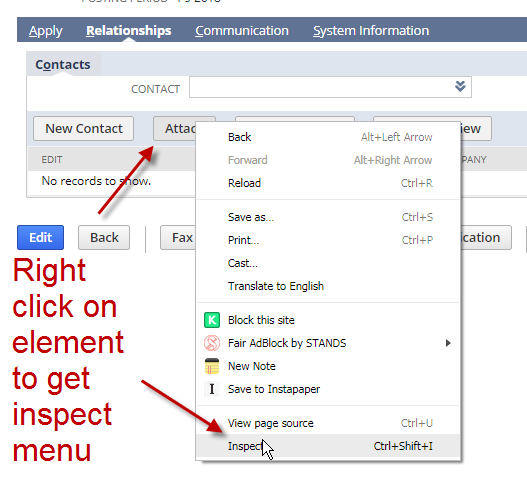
Click on related images to learn how to discover the names of the buttons that you want to hide.
NetSuite Client-Side Script to Hide Buttons
Below is a NetSuite beforeLoad server-side 2.0 SuiteScript to create a hidden HTML field that allows you to inject browser-based client-side JavaScript (not a NetSuite conventional client script) that will then find the buttons and use CSS to change the visibility to hidden via JQuery.
//create an inline html field
var hideFld = context.form.addField({
	id:'custpage_hide_buttons',
	label:'not shown - hidden',
	type: serverWidget.FieldType.INLINEHTML
});


//for every button you want to hide, modify the scr += line
var scr = "";
scr += 'jQuery("#print").hide();';
scr += 'jQuery("#addmessage").hide();';
scr += 'jQuery("#addcontact").hide();';

//push the script into the field so that it fires and does its handy work
hideFld.defaultValue = "<script>jQuery(function($){require([], function(){" + scr + ";})})</script>"
Get Expert NetSuite Customization Help
In my mind, one of the major reasons NetSuite is so valuable is that we can enhance the system to address our business concerns. Even if NetSuite does not expose every business element for manipulation, there is sufficient room to be creative to “get the job done”. If you have a NetSuite challenge and you need strong professionals who will listen, understand, invent and deliver on innovations, let’s have a conversation.










Hey Marty,
I tried this out, but I’m getting the following error:
TypeError: Cannot read property “FieldType” from undefined (/SuiteScripts/hide_buttons.js#13)
Line 13 is the var hideFld section. Thoughts?
Hi Steven,
You will need to use the browser inspection to see what is happening in your script if this is client side. Add console.log statements to help you step through your code. Yet, this looks like it may a server-side suitelet error. Thus, confirm you are actually connected to the context object in your definition. I suspect that you may not have set up your SuiteScript 2.0 Define and Require statements correctly.
Marty
Hi Marty,
Great thanks for you blog, it is very useful.
We have a similar issue in our company. We need to hide the component sublist from the item forms and any transaction forms where this is shown as it contains very sensitive information and only a really small number of person can have access to this (read and/or write).
Can we consider this in the same way?
Thanks
David
Hello David,
Yes, you should be able to. The key to this is to be willing to find the elements you need and then use some DOM (via JQuery) commands to add custom CSS. Of course, there is some risk in this approach but that’s an assessment for you to make. I may write another article on this.
Marty
Hi Marty,
This does not seem to work on the LineInit function.
Do you have an alternative for this? My goal is to hide the ‘add,remove, etc’ buttons from a sublist.
Regards,
Hi Marty
Great tip! Very useful.
In a similar vein, are you aware if there is a way to change the colour of the native buttons on forms?
I have tried:
var scr = ‘jQuery(“#tdbody_custpage_printdocumentsv2”).css(“backgroundColor”, “#blue”);’;
But no result.
custpage_printdocumentsv2 is the internal ID of the button created with UES.
Cheers
Steve
Marty,
You mentioned Client Script 2.0 which I think is misleading since you should be putting this code as a UserEvent Script which triggers a script on the client side. Client Scripts don’t have a beforeLoad trigger and they don’t have context.form and you must use a UserEvent script for contexts such as ‘view’ as client scripts don’t trigger on those contexts.
I just want to help those folks out here who are confused such as Steven above.
I’ve done similiar work here mimicking the message 2.0 api’s using userEvent scripts to create a automated alerts for transactions within configurable saved searches.
Thanks – Brian
Hi Brian,
You have a very good point. I think I have misled folks by calling it client-side script. In my mind, I was thinking client-side (as in the browser) but in NetSuite listening, we know this is a specific script type. Here is the issue. The actual logic to hide the button (the jQuery part) is obviously being performed in the browser, and thus, “classically speaking” it is in a client script.
But using NetSuite’s terminology, we are NOT putting it into what NetSuite calls a “Client Script.” Rather, it is a snippet of code that we are injecting from a User Event script. We have to do it this way, because, in VIEW mode, we can’t attach a true NetSuite Client-Side script.
I will update the language a bit in the article. Thank you for reaching out and helping it be more clear.
Marty
Hi Marty,
Great Article, I am new to scripting in netsuite, how to do get this script to trigger before the record is loaded?
Thanks
Mat
Hello Mat,
This script is running on the client but is served by the server in the beforeLoad record event. I recommend checking out Eric’s website for all kinds of help for learning how to program in NetSuite:
https://stoic.software/cookbooks/
Marty
Is there any way to apply this type of script to a Dashboard Tile portlet – I am trying to hide some text on the Tile using jQuery but it seems the Tiles are encased with iFrames, so I am struggling to get any jQuery placed elsewhere on the page (i.e. in a custom HTML Portlet) to impact the Tiles
Hi Paul,
There probably is. I would have to dig into it. Walking all the way back up the DOM tree can be complex.
Consider this article:
https://stackoverflow.com/questions/10748449/access-and-change-parent-page-from-iframe-with-jquery
It should work in NetSuite because we are in the same domain.
Marty
[…] 22, 2018). Learn how to Hide NetSuite Sublist Buttons and Other HTML Elements. Available at https://blog.prolecto.com/2018/09/22/learn-how-to-hide-netsuite-sublist-buttons-and-other-html-eleme… [Accessed July 30, 2020] II)Marty Zigman (June 13, 2020). How To Stretch and Fill NetSuite Inline […]
I noticed recent activity on your thread so I thought I would share my solution. Same concept but no client script running. This prevents elements from appearing on the page and then disappearing when the script runs onload.
define([],

function() {

    function beforeLoad(scriptContext) {

    	if(scriptContext.type!='view' && scriptContext.type!='edit') return;

    	var form = scriptContext.form;

		form.addField({type: 'inlinehtml',id:'custpage_bluchat_msgs',label:'msg script'})

            .defaultValue = ' .subtabblock form{display: none !important;} ' +

            '.uir-action-button{display: none !important;} ';

    }

    return {beforeLoad:beforeLoad};

});
Thank you David,
I will need to give this a try as it should produce a better user experience.
Marty
Hi Marty, Have you had a play with David’s method? Is it faster?
Hi Sam,
Once I get a chance to try, I will write about it.
Marty
Hi Marty,
could you provide a working example of David’s method?
Thanks,
Sam
Something I’ve used successfully in client scripts doesn’t require you to set a custom html field.
function fieldFocus(param) {
document.getElementsByName(param.id)[0].focus();
}
function fieldStyle(param) {
if (!param) return;
if (!param.id || !param.style) return;
var element = document.getElementById(param.id);
param.style.forEach(function(s){
element.style.setProperty([s[0]],s[1],s[2]);
});
}
fieldFocus allows you to control where the cursor goes.
fieldStyle accepts {id: xxxx, style: xxxx} with id being the field/object internal id, while style is an array of normal html styles. I’ve successfully used it to hide elements where they have an id tag set.
David’s method is also handy, and potentially could execute faster as it’s pre-defining html code, it could also be overridden by html executed from a client script.
I’ve also used BeforeLoad scripts to preload other libraries such as tabulator.js
Thanks Steve. Always good to get another approach.
Marty
Hi Marty,
I tried this solution, and it’s working as well as sublist line buttons (removed the “Insert” and “Remove” button using this). Can this be done as well to disable the buttons? I tried using the .prop() jQuery API to disable them, but to no avail.
Hello Bob,
To disable buttons is a different approach. A search revealed this suggestion:
https://stackoverflow.com/questions/71707721/how-to-disable-custom-button-button-after-one-click-in-netsuite-suitescript2-0
If you were going to use JQuery, not only will you need to modify the look to be disabled, but you will also need to modify the event binding so that the actions do not happen. That’s why hiding is easier.
Marty
Hi Marty,
This code worked for me but it shows an empty table coulmn and has colour.. How do I change it.
@Priya, Probably a little late to the party for this but here’s what I did to overcome the left over sub-table and main-table cell that was left behind…
In my case, I was removing buttons from child record sublists on a custom record… We wanted to hide the “New X” buttons based on certain conditions such as the parent record being in a status of Complete or Cancelled.
I used the code from Marty and through inspection of the page source I identified what element was holding the button, followed it up to the of the main-table, and I used the below jQuery to hide one element up from the target… I had to do this because the code NetSuite generates for the main table did not name/id the elements…
scr += ‘jQuery(“#targetElement”).closest(“td”).hide();’;
So, in the case of whatever element you removed… if there was a table being left behind with no name/id to target, you can just use .closest(“[TAG]”) before .hide() to target it.
Hi,
Great thanks for your blog, it is very useful.
Marty,
I think we could have easily achieved this by using an html type field and write the client js code in it to hide the Buttons .
Regardless great article and useful blog!!
Sutha
Hi Sutha,
Indeed, I talked about this inline html pattern in 2012 with this article:
https://blog.prolecto.com/2012/07/28/bind-netsuite-suitescript-client-side-code-in-form-view-mode/
Marty
Hi Marty,
This works great! Thank you.
I’ve tried using this on a custom record sublist. (I’m hiding the edit and remove button). It works on the sublist displayed when I first load the record, but it doesn’t worked on the sublist in 2nd or 3rd tab. Do you have any fix for this kind of scenario? Here is my partial code:
scr += ‘jQuery(“#’ + CDtableId + ‘ tr”).each(function () {‘;
scr += ‘jQuery(this).find(“td:first, th:first”).hide();’;
scr += ‘jQuery(this).find(“td:last, th:last”).hide();’;
scr += ‘});’;
Hi Jennie,
We have found that you have be almost Ninja like to get that JQuery right. Like you, I would need to keep trail and error on it. These days, I go to the GPTs and supply it the HTML to often give me rapid insights.
Marty