

This article is relevant if your NetSuite environment depends on multiple processing jobs that must work together, and you need better visibility, control over failures, and flexibility to adapt the sequence without continually modifying scripts.
TL;DR Summary
The Prolecto Job Processor accelerator template now supports enhanced orchestration of multi-stage processing. Teams can monitor an entire processing pipeline, inspect individual job outcomes, control how processing responds to errors, coalesce duplicate jobs, and manage job sequencing through the user interface. The result is greater operational control and confidence without embedding every dependency in script logic.
Background
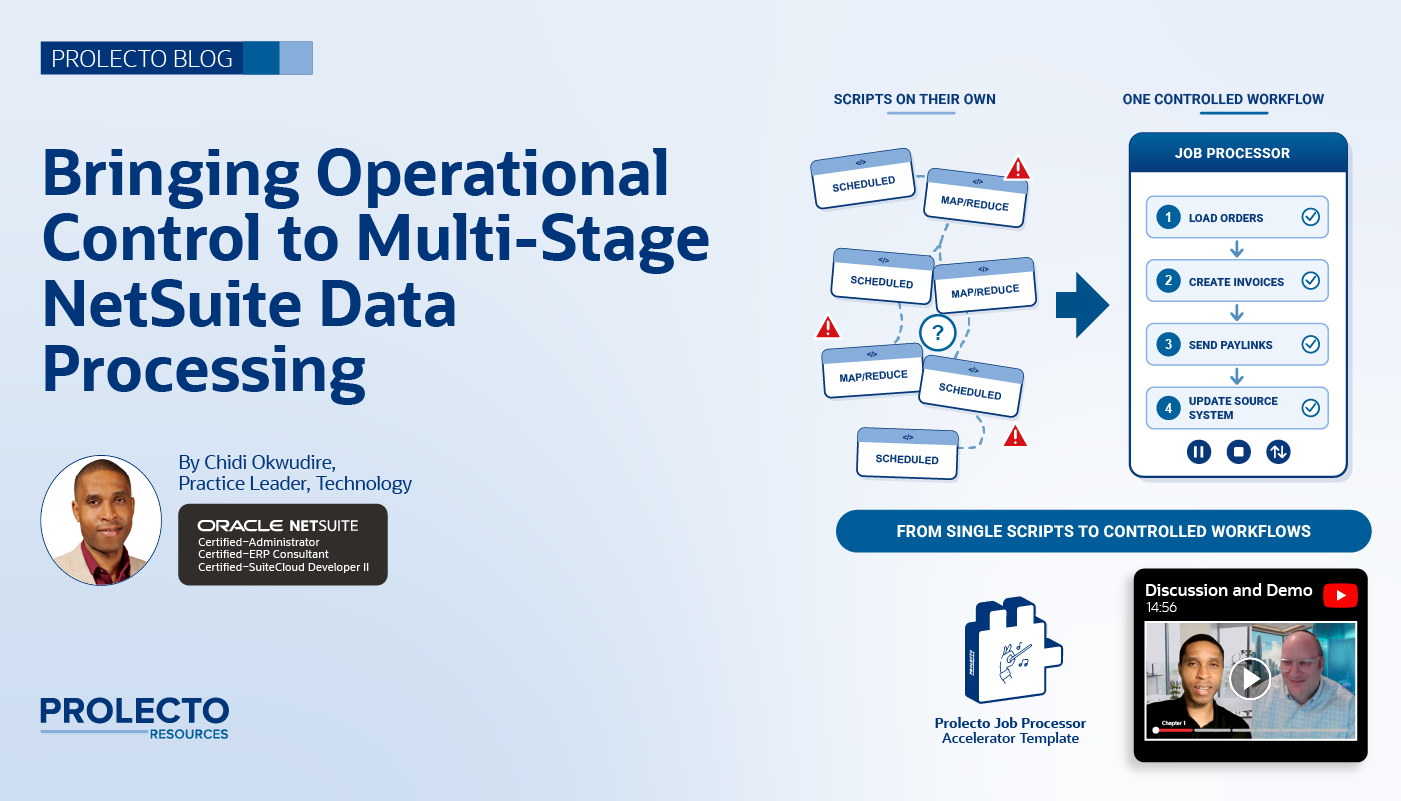 In our work with clients, we regularly encounter situations where getting data into NetSuite is only the beginning. The data must then pass through multiple processing stages before it produces the intended business results.
Consider a recent project in which incoming data needed to pass through seven or eight distinct Map/Reduce scripts before producing general ledger transactions and other artifacts. Each script performed different work and generated outputs for subsequent steps. The solution architecture is robust and the scripts needed to execute in a particular sequence.
Our existing Prolecto Job Processor accelerator provided the foundation for executing these jobs. However, coordinating the complete process introduced a different challenge. How could we see what was happening across all the stages? How could we identify where errors occurred, understand processing time, and decide whether the workflow should continue?
We extended the Job Processor to address these challenges.
In our previous article, How to Build Scalable NetSuite Batch Processing Without More Middleware, we explored how a NetSuite-centered processing architecture can reduce external dependencies while improving control and scalability. This enhancement builds on that foundation by focusing on a critical operational question: how do we manage complex processing as one coherent workflow?
NetSuite Job Orchestration: From Executing Jobs to Controlling the Process
NetSuite’s Map/Reduce framework is well-suited for executing substantial processing workloads. However, when a business process requires multiple jobs, simply launching each script is not enough.
The challenge is understanding how the jobs work together. What ran? What failed? How long did each stage take? Should processing stop when an error occurs, or can other work safely continue?
When these decisions are buried in individual scripts, the team must reconstruct the process from technical details. Even straightforward changes can require development work.
We sometimes see clients respond to these challenges by moving processing intelligence out of NetSuite and into an integration platform as a service (iPaaS). These platforms often provide attractive visualization, orchestration, and error-handling capabilities. The temptation is understandable: if the business needs better control over a multi-stage process, why not use a platform designed to coordinate workflows?
However, when the underlying business logic operates on data already residing in NetSuite, moving that intelligence into external middleware solely to gain orchestration and monitoring capabilities is generally a poor architectural choice. It introduces avoidable integration and coordination overhead, creates additional dependencies between systems, and makes the overall solution more complicated to maintain. Rather than simplifying the business process, we risk distributing its intelligence across multiple platforms.
The better approach is to bring the necessary orchestration capabilities to the system where the business data and processing logic already reside. This does not mean iPaaS has no place; it remains valuable when genuine integration requirements call for it. The point is to avoid introducing another layer of infrastructure merely to compensate for operational controls that can be provided within NetSuite.
The Prolecto Job Processor orchestration enhancement addresses this by making the processing sequence and its operational state visible in one place. An important architectural principle is that the Job Processor does not implement the business logic of the jobs it coordinates. Instead, it uses job delegation to trigger the appropriate action (e.g. a Map/Reduce or Scheduled script) for each processing stage.
The Job Processor does not need to understand the details of the delegated script, the business rules it applies, or the records it processes. It manages the execution and coordination of the jobs while the delegated scripts remain responsible for their own business logic.
This separation is deliberate. It keeps the orchestration framework independent of the business processes it coordinates, allowing the same accelerator to manage different types of processing without embedding process-specific logic into the Job Processor itself. We can therefore improve visibility, sequencing, and operational control while keeping the underlying business logic close to the NetSuite data it operates on.
See the Processing Pipeline
The Job Processor Dashboard gives administrators a consolidated view of configured job types and their current operational state. From there, they can inspect a pipeline, review individual stages, identify jobs requiring attention, and examine available execution metrics.
This visibility is valuable beyond troubleshooting. Understanding elapsed time and the duration of individual stages can help teams identify where processing is spending time and where further investigation may be warranted.
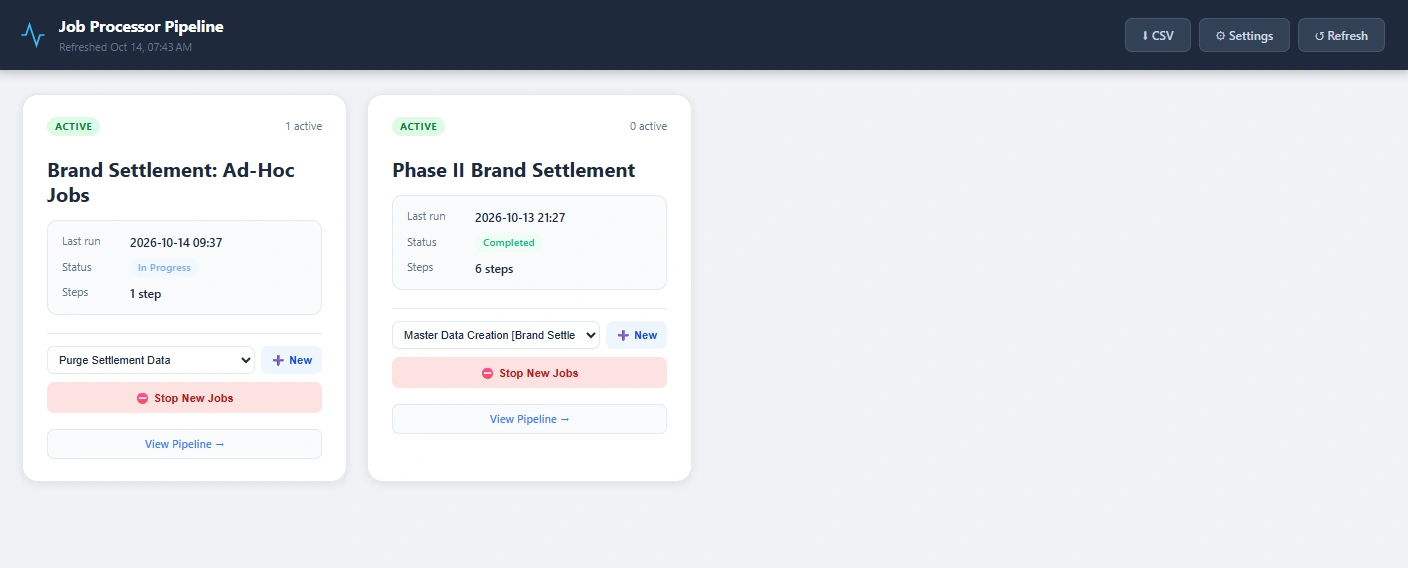
Within the pipeline view, administrators can follow the sequence of jobs and quickly identify successful steps and those that have completed with errors. They can also inspect individual job details to better understand the outcome.
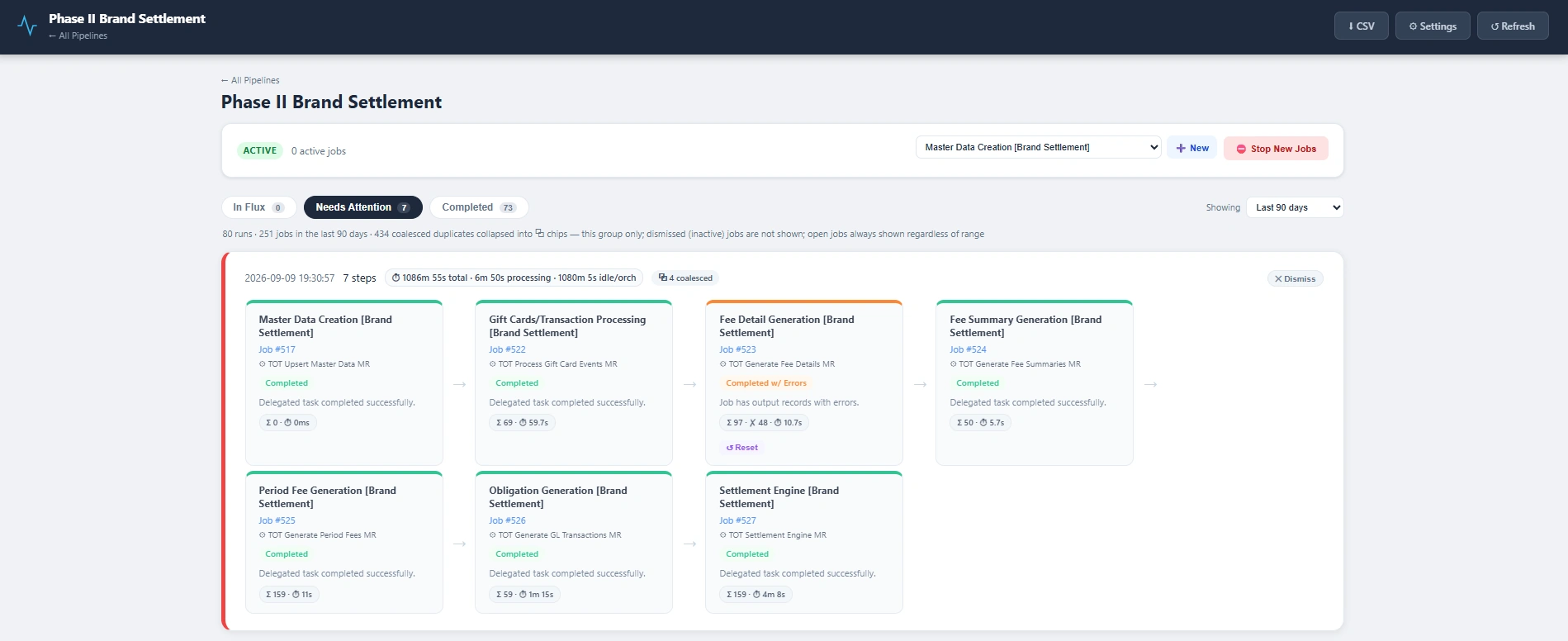
The objective is not merely to display activity. It is to give the people responsible for operating NetSuite enough context to understand the process and make informed decisions.
Proposed Solution: Make Operational Control Part of the Architecture
We designed the enhancement around a practical principle: the system should give people meaningful control over processing behavior, not simply report what happened after the fact.
Several capabilities work together to support that goal.
- Control at the group level. Some failures are serious enough that additional processing should stop. For example, if an incoming data feed encounters a critical processing problem, continuing to process subsequent batches may compound the issue. The system supports stopping further processing while queued work remains available for attention and subsequent handling.
- Control at the individual-job level. Other failures may affect only one stage or pipeline. In these cases, the team may need to prevent that particular process from advancing without blocking unrelated work. The enhancement supports different control options to accommodate these operational requirements.
- Consolidated visibility. Administrators can review the overall pipeline and drill into individual jobs to understand status, errors, and timing. This makes it easier to identify where attention is needed.
- Duplicate-job coalescing. External systems may submit equivalent work repeatedly while an existing job is already underway. Where jobs can be identified as duplicates, the processor can coalesce redundant requests rather than needlessly repeating the same work.
- Export metrics for offline analysis. The Job Processor allows processing metrics to be exported to CSV, making it easier to examine execution data outside of NetSuite. Teams can use spreadsheet tools or AI to compare job durations, identify processing patterns, and investigate performance trends over time. This extends the value of the operational dashboard by allowing teams to conduct deeper analysis beyond what is immediately visible in the interface.
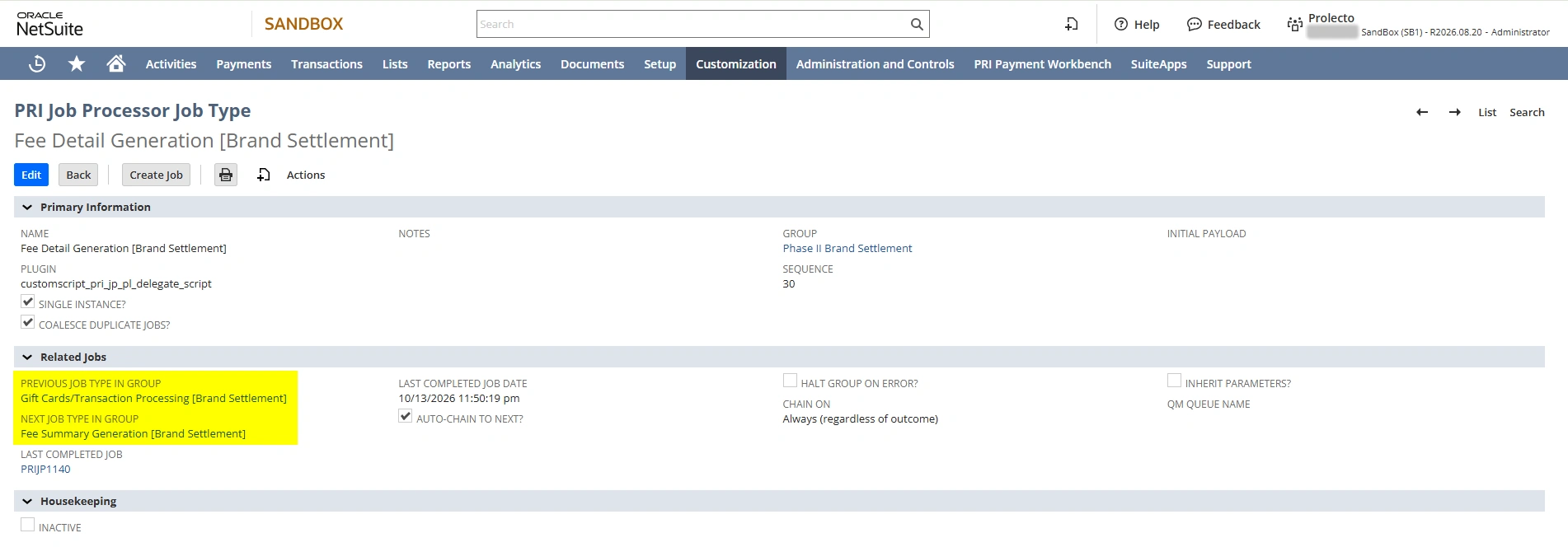
These capabilities address different aspects of the same problem. Visibility helps people understand what is happening. Control options help them determine what should happen next. Together, they make complex processing more manageable.
Watch the Job Processor Orchestration Demonstration
In the video below, I interview Elie Ciment, Technology Practice Manager and lead designer of this solution. We demonstrate the enhanced Prolecto Job Processor, including the dashboard, pipeline visibility, job-level details, and the controls available for managing multi-stage processing.
The demonstration shows how the framework brings distinct jobs together into a process that can be understood and managed without requiring administrators to trace the entire sequence through individual scripts.
Implementation Playbook
The value of orchestration comes from more than connecting jobs in sequence. It requires a thoughtful approach to modeling the workflow, configuring how jobs interact, and establishing the controls needed to operate the process reliably. The following practices illustrate how to apply the Prolecto Job Processor accelerator to create processing workflows that are easier to understand, monitor, and adapt as business requirements evolve.
- Model the workflow as a sequence of jobs. Each processing stage remains responsible for its own business logic. The orchestration layer coordinates the jobs and manages their relationships. This separation allows the framework to remain reusable across different business processes.
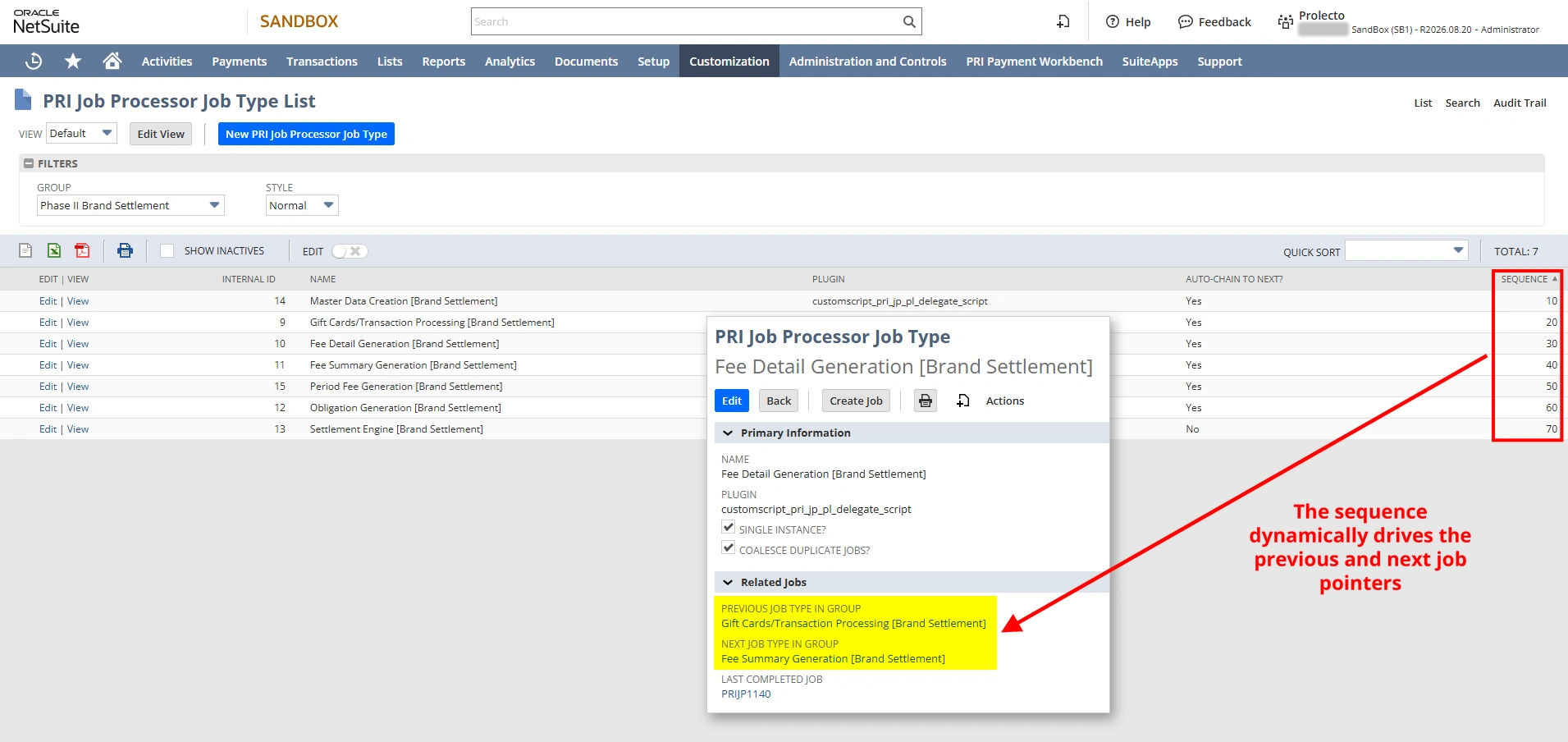
- Configure sequencing through the user interface. In earlier implementations, we sometimes embedded job chaining in the summary stage of Map/Reduce scripts. We even numbered scripts to make their execution order apparent. When another stage needed to be inserted in the middle, renumbering scripts and deployments became a maintenance burden. With the enhanced Job Processor, administrators can manage the order and chaining of job types through configuration instead.
- Select the appropriate operational controls. Different workflows have different requirements. Some errors should halt a processing group, while others should affect only an individual job or pipeline. The implementation should reflect the business consequences of continuing or stopping, rather than applying the same response to every error.
- Use processing metrics to guide investigation. Execution timing and job outcomes help teams understand where delays or errors occur. These observations provide a practical starting point for further analysis without assuming that every delay requires a code change.
- Account for repeated requests. When external systems can submit work faster than it is processed, duplicate-job coalescing can help avoid unnecessary repetition. The appropriate behavior depends on whether the requests truly represent equivalent work.
Better NetSuite Engineering Starts with the Right Questions
There is an interesting distinction worth making in today’s AI-enabled development environment.
We deliberately did not make this demonstration about how the dashboard was built. AI capabilities are making it easier to produce user interfaces, write code, and accelerate implementation. Those are valuable advances, but the existence of a dashboard is not the most important part of this solution.
The more consequential work is deciding what the dashboard should communicate, which controls operators need, how different failure scenarios should be handled, and how to structure the architecture so it can adapt as business requirements evolve.
That is where experience matters.
Our team has spent years working through the realities of NetSuite processing, integration, and accounting. We understand that a technically successful script does not necessarily produce a reliable business process. The design must account for dependencies, exceptions, operational responsibilities, and the need to change the system safely over time.
This enhancement reflects that philosophy. We are taking a recurring problem and solving it through a reusable architecture rather than leaving every client to develop a separate orchestration mechanism.
As with our other accelerator templates, we make this intellectual property available to our clients without an additional licensing charge. We believe clients should benefit from the engineering patterns and solutions we have developed through our work.
Our commitment is to listen carefully, model the real business problem, apply sound technical judgment, and execute with craftsmanship. AI can help accelerate that work, but the objective remains the same: deliver solutions that give clients confidence and control over their NetSuite investment.
Frequently Asked Questions
How do you run multiple Map/Reduce scripts in sequence in NetSuite?
Treat the workflow as a sequence of jobs, where each script keeps its own business logic. The Prolecto Job Processor accelerator template uses job delegation to trigger each Map/Reduce or Scheduled script in order, and administrators configure the sequence in the user interface instead of chaining scripts in each summary stage.
How do you stop NetSuite processing when one job fails?
Decide based on the business impact. For a critical failure, such as a problem in an incoming data feed, stop the whole processing group so later batches don’t compound the problem, while queued work stays available. For a failure that affects only one stage, stop just that pipeline so unrelated work keeps running.
How can you see which stage of a multi-step NetSuite process failed or ran slowly?
Use a dashboard that shows the whole pipeline instead of tracing individual script logs. The Job Processor Dashboard shows each stage’s status, errors and elapsed time, lets administrators drill into individual jobs, and exports processing metrics to CSV for deeper analysis.
Do you need an iPaaS to orchestrate NetSuite processing?
Not when the business logic works on data already in NetSuite. Moving that logic into middleware only to gain monitoring and orchestration adds integration overhead and dependencies between systems. iPaaS is still the right tool for genuine integration needs, as covered in How to Build Scalable NetSuite Batch Processing Without More Middleware.
How do you prevent duplicate jobs from running in NetSuite?
When an external system submits the same work while a matching job is already underway, the Job Processor can coalesce the duplicate requests into one instead of repeating the work. This applies only when the requests truly represent equivalent work.
If you found this article relevant, feel free to sign up for notifications to new articles as I post them. If you are ready to improve control over multi-stage NetSuite processing, let’s have a conversation.