


This article is relevant if you use NetSuite manufacturing and would like to know how many potential assembly quantities are available.
Background
NetSuite assembly record types are used for various kinds of manufacturing. The assembly’s fundamental feature is the ability to be used with NetSuite work orders to be presented as instructions for building an item based on sub-items. While not strictly true in all cases, the work order gets its instructions from a bill of materials. The bill of materials defines the quantities of sub-components consumed in an assembly product. Assemblies can become complex because a bill of material sub-component can be another assembly (which we then call that item a subassembly). The pattern of collectively defining yet more assemblies as sub-components is called a multi-level bill of material.
Once assemblies are built, they act like regular inventory items. We can quickly look up how many are on hand, and they can be distributed in a network of warehouses. Yet, assemblies also represent possibilities. If we have sufficient quantities of sub-components, we could build more assemblies if we put the energy into it. This quantity is the Potential Buildable Quantity.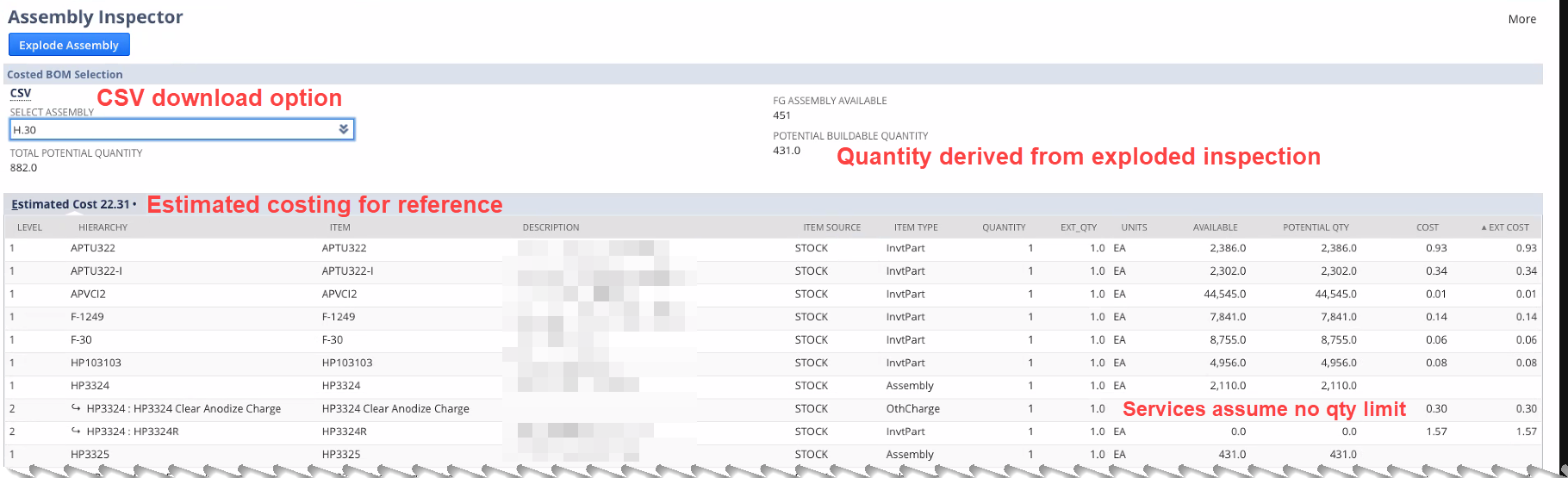
A client new to the NetSuite platform contacted my firm to get help with the Potential Buildable Quantity. In their line of business, they need to be able to quickly tell their customers if they can deliver on potential and existing order commitments.
Calculating the NetSuite Potential Buildable Assembly Item
Similar to the Available to Promise concept, the Potential Buildable Quantity is a different type of planning concept. Whereas NetSuite Available to Promise concept considers existing inventory, purchase orders, work orders and transfer orders, the Potential Buildable Quantity is designed to consider what may be possible if the organization were to make an immediate commitment to building an assembly with existing inventory on hand.
The calculation is challenging due to the multi-level bill of materials structure. If any component in the tree of sub-components is not available, then the potential to create new items, at this time, is zero. However, with NetSuite SuiteLet technology’s power, we can do the recursive searches needed to determine the Potential Buildable Quantity. As such, we created a tool that can answer these questions.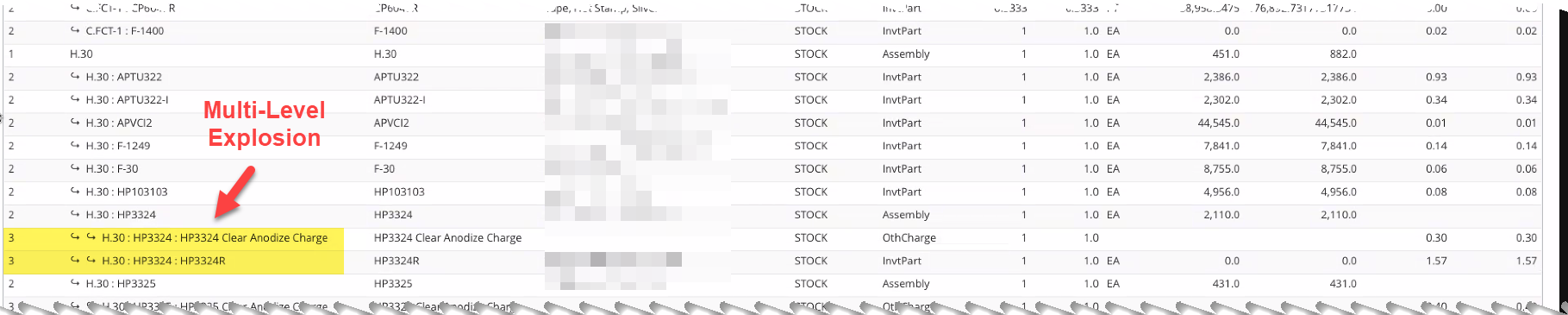
Introducing the Assembly Inspector
We built an Assembly Inspector tool that will allow planners to explode all the sub-components so we can see what we have on hand and which is not already committed to determining the Potential Buildable Quantity. The tool thus offers the following capacities:
- Select Assembly: no matter where you are in the assembly hierarchy, you can select an assembly to inspect. Thus finished goods and sub-components are all candidates for inspection.
- Multi-Level Inspection: as we explode out the assemblies, we can build a multi-level tree to output all available sub-component items. Using the bill of materials, we can determine the number of items that would need to be consumed if we were indeed going to build the assembly in question.
- Find Offending Items: In the act of inspection, it only takes one item to have insufficient inventory available to drive Potential Buildable Quantity to zero. We surface all the offending items so that management can determine what they may need to do to obtain more stock to realize the potential.
- Total Potential Quantity: once you calculate the Potential Buildable Quantity, you can add that number to the Available Quantity to indicate the overall Potential. This number is meaningful to the sales organization and other planners as they assess their courses of action in the production schedule.
- Costing Estimate: because we are rolling up the sub-components, we can easily indicate the potential cost for inspected assembly. In my 2015 article, NetSuite Best Practice: Capitalizing Assembly Unit Costs, I previously wrote on assembly costing.
- CSV Download: A CSV download feature offers a quick way to give planners report outputs for manipulating a spreadsheet.
- Software Library: we wrote the software in a manner that allows us to calculate the values without the user interface. This means we can easily produce the Total Potential Quantity in other areas of NetSuite where we need it. The client intends to publish potential quantities on a customer-facing website.
Click on images to get a better understanding of the tool.
Enhancements to the Assembly Inspector
In 2024, we further enhanced the tool to understand the potential buildable quantities embedded in existing assemblies. Please see, Inspect NetSuite Components in Built Assemblies to Drive Potential Buildable Quantities.
Get the Assembly Inspector
I thank Elie C., Senior Technical Analyst, for his leadership in this tool. His good work was behind my recent article, NetSuite Batch Printed Work Order Travelers Your Way. We included the Assembly Inspector in a set of other bundled tools we call Business Process Automation (BPA).
Like all the tools and applications we offer our clients, we offer this tool free of license charge as part of a service engagement. Our business model is to help our clients fit these accelerator tools into their business process and, where desired, refine the application to help address other emergent requirements. The bundles help us drive down the cost of software distribution to focus on what is most meaningful to our clients: the end solution.
If you found this article relevant, feel free to sign up for notifications to new articles as I post them. If you have similar challenges with your NetSuite assembly item work, or you would like to obtain the Assembly Inspector, let’s have a conversation.










