


This article is relevant if you are looking to produce a complex Saved Search that uses criteria expressions and you also seek to use a one of the items as an available filter.
Background
During a recent NetSuite implementation, I needed to create a lookup tool to help our client inspect their item definitions while used in specific advanced configurations. I needed to use expressions to key on the items of interest. I then naturally wanted to use the one of the criteria in the available filter drop downs so the users can have options during their lookup work. As I tried to save the Saved Search, I received the “You cannot use an expression builder criteria filter as an available filter” error message.
Solving the Available Filter Expression Challenge
The key to solving this expression builder filter challenge is to use formulas instead of direct field references. Usually this can be done because you know the criteria condition you are looking for in advance. In the attached image, I am seeking to filter on a checkbox which Yes / No is supplied by a ‘T’ or ‘F’ by the database. By using a decode function (or a case statement), I get the criteria I need. But then I also fool the Saved Search tool so that I can use the column that I really care about in the Available Filters definition.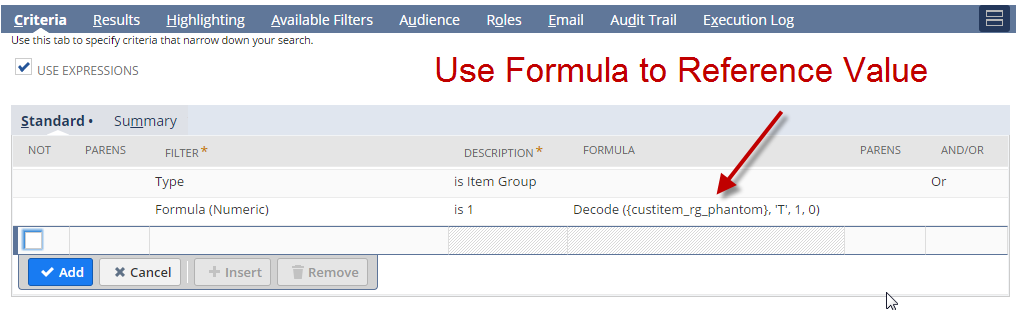
Get Advanced NetSuite Support
NetSuite is a flexible business system and the platform allows us to be creative on how we adapt the system to fit requirements. If you are looking for professionals that can help you extract more value from your NetSuite investment, let’s have a conversation.










Hi Marty Zigman,
I have a query related to filters. I am creating a saved search of Transaction type. I which I have to filter out only those booking transaction which have status either Cancelled or Refunded. Which field should I use? I have checked all the status fields but they don’t have Cancelled & Refunded option to filter out.
Thanks.
Did you see this article which gives you some clues how to get the values you are looking for?
https://blog.prolecto.com/2013/08/30/netsuite-searchfilter-transaction-internal-status-list/
Hi Marty,
Many thanks for posting workarounds and/or new ways to utilise NetSuite.
I am not sure if the above “Decode” formula works unless you change to “is Not Empty” rather than ” is 1″
Regards
Reza
Hi Reza,
Perhaps the NVL2 function can be used as well.
Marty
how could we make [Amount] as available filters? it would be great to search for transactions that match a given amount value
thanks
I agree it would be good with native tools. If I come up with a technique, I will update the article.
Marty
Marty,
I was able to list all the transactions that match a given amount using the reports instead of a saved search. Maybe this helps