


This article is relevant if you share NetSuite information with customers, vendors, or partners through Suitelets that don’t require a NetSuite login and want more control over who can see or change that information.
TL;DR Summary
Inventory every Suitelet marked Available Without Login. Retire what you no longer use, check the execution role on what remains, and decide how much identity assurance each business process needs. A short-lived email code can improve access control for lower-risk interactions. Sensitive information and consequential transactions call for stronger authentication.
Background
A customer needs to check an order or approve a quote. A vendor needs to upload a document. A partner needs to complete an intake form. Each may need NetSuite for only a minute. Setting up an account and managing access for each visitor can cost more effort than the interaction warrants.
A Suitelet is a custom page built on NetSuite. When you enable Available Without Login, NetSuite provides an external URL anyone can reach. With the appropriate deployment and audience settings, visitors can use the page without a NetSuite session. The experience resembles an anyone-with-the-link file share. I’ve demonstrated both a customer-facing order viewer and an upload workflow that avoid a named NetSuite login for the visitor. See the following articles
- 2022: NetSuite Customer Facing HTML Based Order Viewer Demonstration
- 2023: Learn How to Upload Data to NetSuite without End User Licenses
Why NetSuite Suitelets Deserve a Fresh Review
Sometimes called “Security Through Obscurity,” a long URL can be hard to guess. However, it can be forwarded, retained in an old email, or left in circulation long after a project ends. The arrangement depends on who has the link. It gives you little control over who uses it or when their access should expire.
We’ve seen this pattern before. Email gave us spam and phishing. Cloud file sharing gave us links that outlasted their purpose. AI now lowers the effort required to find and inspect exposed pages and automate repeated interactions. For a Suitelet that reads business records or accepts submissions, a poorly built URL endpoint can disclose confidential information, breach customer commitments, cause reputational harm, and allow unauthorized changes to NetSuite records.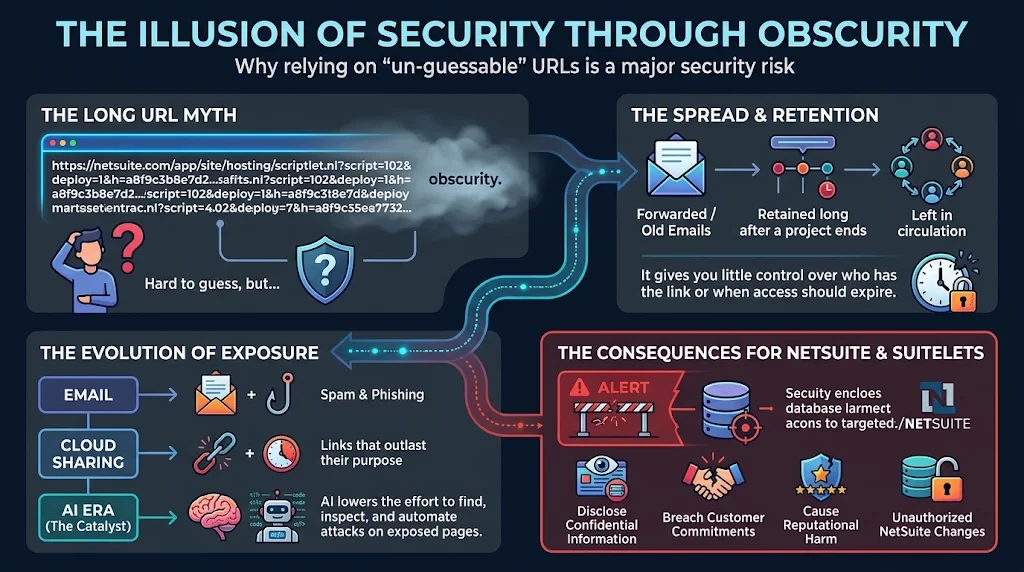
Review Access Before Building a New Sign-In
Start at Customization > Scripting > Script Deployments. Find each Suitelet marked Available Without Login and verify its deployment status and external audience. Oracle documents that the external URL requires a Released deployment and Online Form User selected under External Roles for anonymous access. See related document: Oracle’s guidance on Available Without Login URLs.
A recurring deployment saved search makes the inventory easier to revisit each quarter. The SuiteQL inventory below lists deployments with the checkbox enabled. The AI MCP audit prompt below takes the review further through a connected NetSuite MCP tool or Ask Oracle where the necessary records are accessible.
For each deployment, establish who owns it, who still uses it, what it reveals, and what it accepts or changes. A generic contact form may remain public with appropriate submission controls. A retired intake form can come down. If everyone who uses a page already has a NetSuite login, turn off anonymous access and use the existing sign-in.
Set the Execution Role
Review Execute As Role on every retained deployment. Start a dedicated role with minimal permissions, add what the Suitelet needs, and test both allowed and denied actions under that role. Yes, using Administrator access can make a prototype easier to get working. But go all the way. Before release, verify that the application runs with the narrower role you intend to maintain.
Use Email Verification Where the Risk Fits
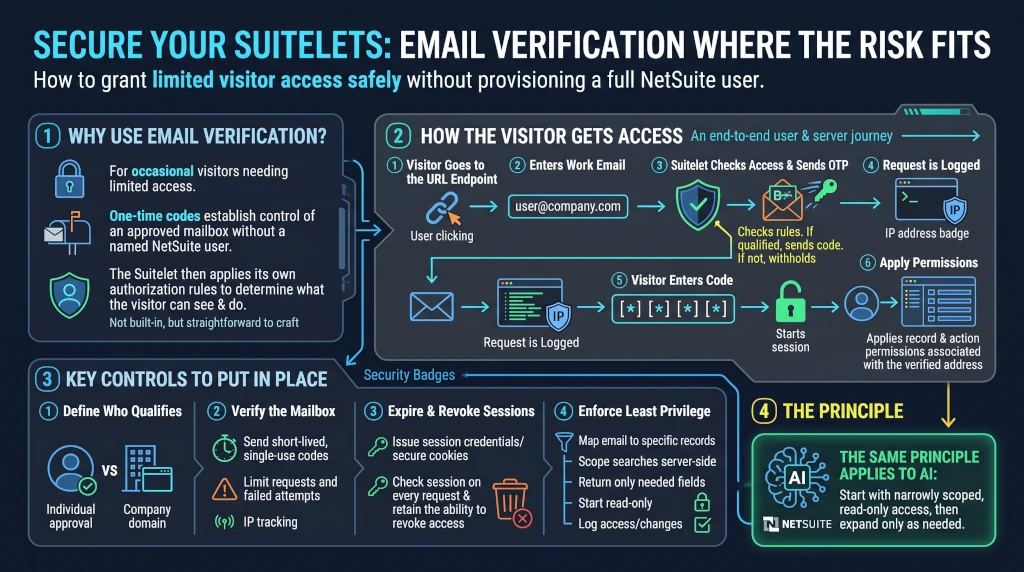
When an occasional visitor needs limited access, an emailed one-time code can establish control of an approved mailbox without provisioning a named NetSuite user. The Suitelet then applies its own authorization rules to determine what that mailbox holder can see and do. This is not built into NetSuite, but the infrastructure makes it straightforward to craft.
How the Visitor Gets Access
- The visitor goes to the URL endpoint.
- The visitor enters a work email address.
- The Suitelet checks the address against its access rules. If the address qualifies, the application sends (emails) a one-time code. Otherwise, the application withholds access.
- Information about the request is logged, including the IP address.
- The visitor enters the code. The application verifies it and starts a session.
- The Suitelet applies the record and action permissions associated with that verified address.
Key Controls to Put in Place
- Define who qualifies: Approve individual email addresses when access is personal. Approve a company domain when the business intends to let anyone with a verified mailbox at that domain qualify.
- Verify the mailbox: Send a short-lived, single-use code. Limit code requests and failed attempts. Temporary lockouts can help, with IP address serving as one signal because legitimate users may share it.
- Expire and revoke sessions: After verification, issue a separate session credential. If the browser remembers the visitor, use a secure cookie with an expiry suited to the exposure. Check the session on every protected request and retain the ability to revoke access for a person or company.
- Enforce least privilege on the server: Map the verified email to authorized records. Scope every search and submission server-side, even when the browser supplies a record ID. Return only the fields the page needs, start with read-only access, grant writes deliberately, and log access and changes for review.
The principle is the same one I apply when connecting AI to NetSuite. Start with narrowly scoped, read-only access and expand it for a specific business purpose. See my recent article, AI and NetSuite: Where Do I Start?.
Match Authentication Approach to the Consequences of a Breach
An email code inherits the security of the inbox it lands in. Codes can be forwarded, and people change jobs. Use your data classification and the consequences of unauthorized access to decide where mailbox verification is sufficient. For higher-risk work, use NetSuite sign-in or a dedicated identity provider with multifactor authentication.
Consider the built-in Customer and Vendor Centers first where they fit. Their workflows and presentation may be sufficient (however, usually wanting). For a deeper ongoing relationship, a purpose-built portal can justify its own identity management and user experience. Consider my 2024 article, Comprehensive NetSuite Portal Solutions with No Additional Modules or Ongoing Costs.
Design NetSuite Access Around the Business Relationship
No doubt, AI can and should help build the Suitelet experience. The work that deserves our attention is deciding who should have access, what they should be able to do, and how we can verify those limits before release. At Prolecto, that starts with listening to the people who use the process and continues through testing the permissions that protect it.
Note, we’re also evaluating passkeys as a stronger option for returning users. That’s a subject for a future article once we’ve worked through the design.
If you found this article relevant, sign up for notifications as I publish new articles. If you’re ready to review your public Suitelets and determine where stronger access controls make sense, let’s have a conversation.
Copy-and-Paste NetSuite Audit Prompt
Perform a read-only configuration audit of the connected NetSuite account.
Identify every Suitelet deployment with Available Without Login checked,
including undeployed deployments, deployments in Testing, and deployments
associated with inactive scripts.

Return one row per deployment with:

- Script name, numeric internal ID, and script ID (customscript…)
- Deployment title, numeric internal record ID, and deployment ID (customdeploy…)
- Clickable links to the authenticated Script and Script Deployment records
- Deployed flag, deployment status, and script inactive flag
- External Roles, including whether Online Form User is selected
- Execute As Role, including role name and internal ID when available
- Exact External URL displayed on the deployment record
- Anonymous access assessment based on the verified settings

Use the deployment record’s numeric internal ID for the authenticated
deployment record link. If using SuiteQL, verify whether
scriptdeployment.primarykey corresponds to that ID in this account.
The scriptdeployment.id field may contain a per-script deployment number
such as 1 or 2. Verify the link target before reporting it.

Report the total flagged and group the deployments by verified configuration:

1. Active script, deployed and Released, with Online Form User selected
2. Active script, deployed and Released, with Online Form User absent
3. Active script, deployed and Released, with external audience unverified
4. Undeployed, in Testing, or associated with an inactive script
5. Other cases where the deployment or script state could not be confirmed

If SuiteQL omits a field, consult the signed-in record or another available
read-only source. Mark anything you cannot confirm as Unverified and explain
the limitation. Return the verified inventory even if some fields are missing.
Keep the results within the private review.

Assess the configuration only. Do not invoke the Suitelets or change settings.
Copy-and-Paste SuiteQL Inventory
Use this read-only query to list Suitelet deployments with Available Without Login checked. It includes the deployed flag, deployment status, and script inactive flag so you can see which entries need closer review. To assess anonymous access, verify External Roles on the deployment record. Use that same record to confirm Execute As Role and the exact External URL.
SELECT
    s.name          AS script_name,
    s.id            AS script_internal_id,
    s.scriptid      AS script_id,
    d.title         AS deployment_title,
    d.primarykey    AS deployment_internal_id,
    d.scriptid      AS deployment_script_id,
    d.deploymentid  AS deployment_number,
    d.isonline      AS available_without_login,
    d.isdeployed    AS is_deployed,
    d.status        AS deployment_status,
    s.isinactive    AS script_is_inactive
FROM
    scriptdeployment d
    INNER JOIN script s ON s.id = d.script
WHERE
    s.scripttype = 'SCRIPTLET'
    AND d.isonline = 'T'
ORDER BY
    s.name,
    d.primarykey