

This article is for Controllers and finance professionals who want to understand how NetSuite’s automatic elimination works and how it will treat intercompany impacts on custom transaction types to support consolidation.
TL;DR Summary
- Every elimination outcome traces back to one field: the line-level “Eliminate” flag. When a line carries true, NetSuite always creates an elimination journal. When it carries false, NetSuite does not, with intercompany inventory and cost of goods sold as the one exception.
- The Eliminate Intercompany Transactions checkbox on the account record changes meaning by account type. On A/R and A/P accounts, it requires elimination. On every other account type, it only permits it.
- Many transaction types never show the line “Eliminate” flag, including invoices, vendor bills, and, in our testing, custom transaction types. On these, NetSuite sets the line flag in the background based on the entity on the header or line, and the account the item posts to.
- Deciding which GL account an item hits and deciding whether that line eliminates are two separate questions. The item record’s “Intercompany” account fields determine the GL account that the item will impact, not whether it will eliminate.
- An intercompany balance that moves from month to month without new activity is usually currency translation. Corrections belong in the source subsidiary, in the source currency.
Why Do NetSuite Intercompany Balances Fail to Eliminate?
Intercompany accounting requires NetSuite to hold two views of the same activity. At the subsidiary level, an intercompany receivable, payable, sale, or expense is a legitimate balance that the local books need to show. At the consolidated level, those same balances describe the group trading with itself and should disappear.
NetSuite reconciles the two views with a dedicated elimination subsidiary. At period close, the elimination process books reversing entries into that subsidiary. Any consolidated report that includes it picks up the reversals, so intercompany activity nets to zero while each operating subsidiary keeps its own balances intact.
Common Problems
The symptoms we see most often when this breaks down:
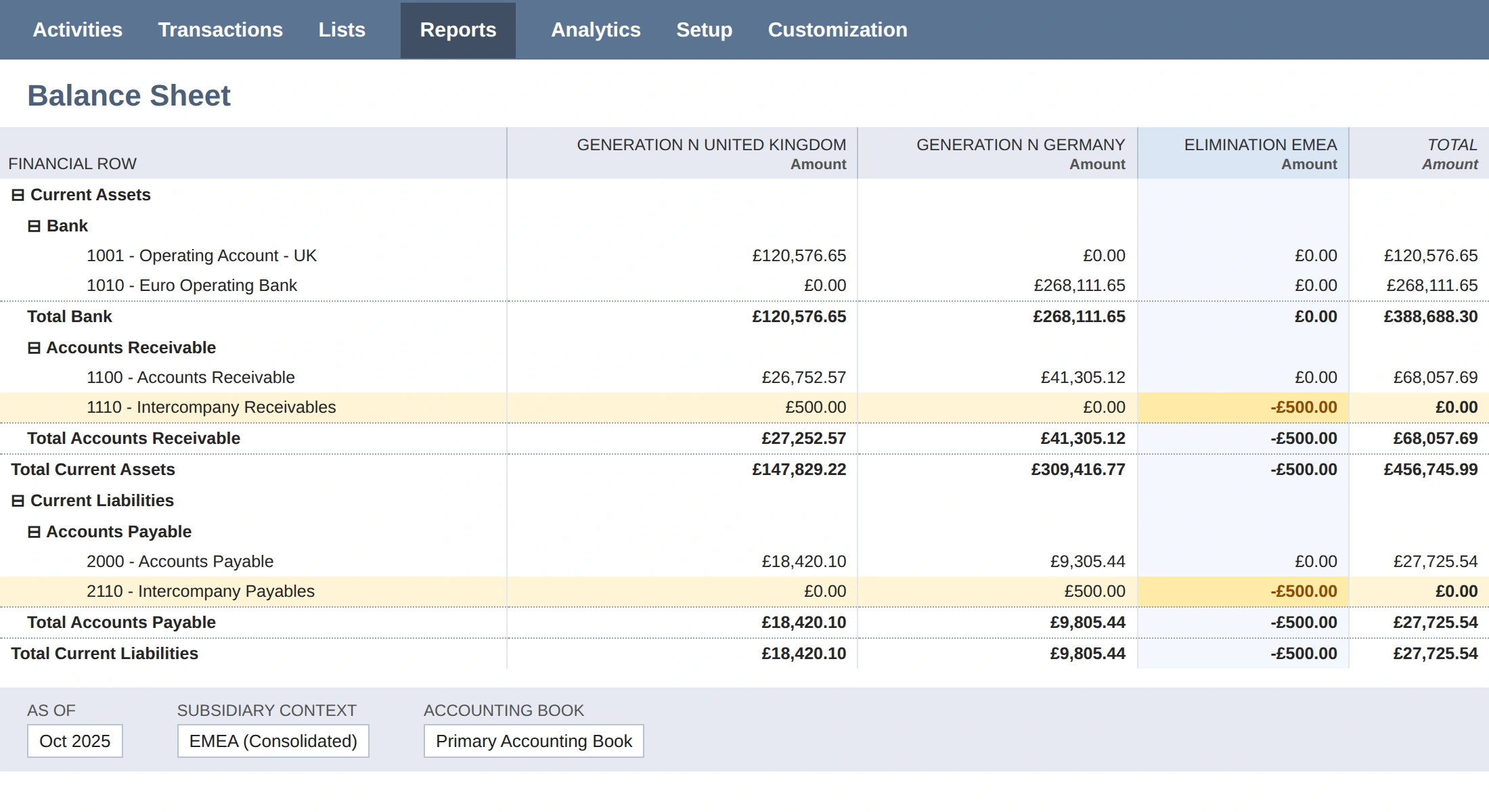
- A consolidated intercompany account carries a balance that should be zero, and a top-side adjustment clears it for one month only.
- Intercompany revenue or expense the team expected to eliminate stays in consolidated results.
- An unexplained amount sits in the CTA-Elimination account.
Each of these traces back to how individual lines were flagged, or to currency translation acting on lines that were flagged correctly. This article walks the logic in the order NetSuite applies it.
Understand the Multi-Tier Logic That NetSuite’s Elimination Engine Depends On
There are two fields in OneWorld accounts that are the levers that control elimination logic:
- A field on the transaction line table: “Eliminate”
- A field on the account record: “Eliminate Intercompany Transactions”
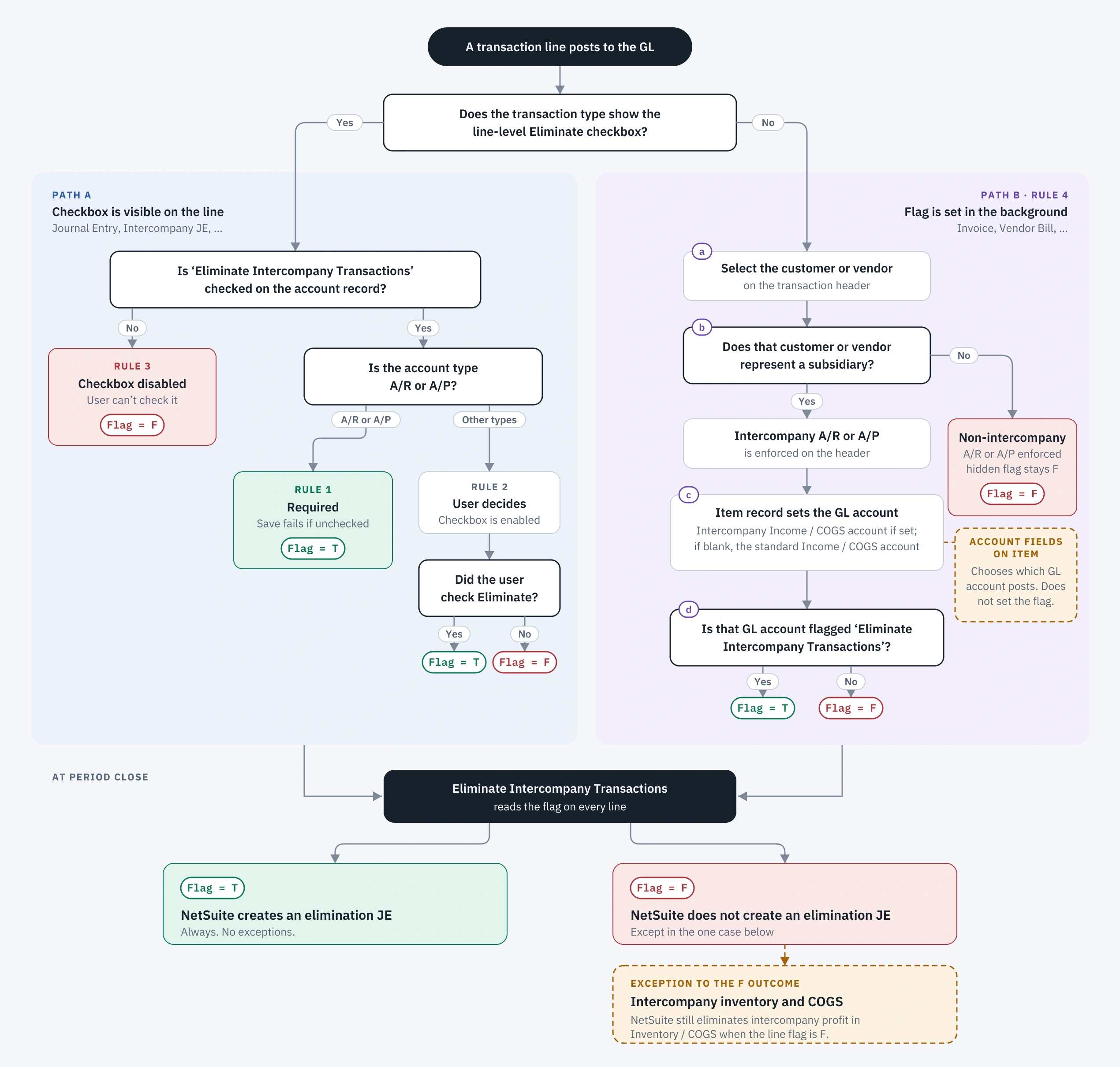
The diagram and narrative below explain how these fields interact with each other to produce the predictable patterns for elimination.
Tier 1: The Transaction Line Flag Is the Source of Truth
The transaction line field “Eliminate” is the surest indicator of elimination.
- The immutable rule. When a line’s Eliminate flag is true, NetSuite always creates an elimination journal for it. I am not aware of any exception. If something blocks the process, such as an inactive subsidiary, an error will appear in the Period Close Checklist rather than silently skipping.
- The 95 percent rule. When the flag is false, NetSuite does not create an elimination journal for that line. The one exception is intercompany inventory: NetSuite will eliminate intercompany profit through standard (non-intercompany) cost of goods sold despite the lack of a corresponding COGS line flagged for elimination. That scenario has enough moving parts to deserve its own article, though.
The practical consequence is that the transaction line field should be the first place to inspect when something fails to eliminate. The field is not available in Saved Searches, but a SuiteQL query can expose the line-level Eliminate field for the transactions in question.
Tier 2: The Account Record Flag Means “Must” or “May,” Depending on Account Type
The GL account field “Eliminate Intercompany Transactions” checkbox is an indirect lever for elimination. The field label suggests that checking it causes elimination; however, this is not necessarily the case. The true purpose of the account record flag is to drive the downstream behavior of the transaction line flag, but the exact logic also depends on the account type.
| Scenario | Account type | Account flag | Line-level result |
|---|---|---|---|
| 1 | A/R or A/P | Checked | Required. The line must be flagged; the customer or vendor must represent a subsidiary. Saving fails otherwise. |
| 2 | Any type other than A/R or A/P | Checked | Permitted. The checkbox is enabled, and the user decides at the time of transaction entry. |
| 3 | All types | Unchecked | Blocked. The checkbox is disabled and nothing on that line eliminates. |
Scenario 1 essentially forces separate GL accounts to be used for intercompany vs. non-intercompany A/R and A/P. When an intercompany A/R or A/P account is used, it enforces controls so that the transaction will not save if the line-level field is not checked. Thus, if an intercompany receivable saves successfully to a flagged A/R or A/P account, it will eliminate.
Scenario 2 covers the accounts where judgment applies: intercompany revenue, intercompany expense, and other current asset or liability accounts some companies use to track intercompany balances. The user “may” select the transaction line field, but they are not forced to.
Lastly, scenario 3 covers all scenarios where the account-level field is not checked. Elimination will not occur, since the transaction line field will be disabled.
Transaction Types’ Impact on Field Appearance
A further point of consideration is the visibility of the transaction line field for elimination and what behavior to expect when transaction types don’t have the field exposed in the UI.
Here’s the expected behavior on Journal Entries:
Journal Entries have the Elimination field exposed in the UI (if you don’t see it, check the custom form to see if the field was hidden at the form level).
- On lines with accounts that have the “Eliminate Intercompany Transactions” unchecked, the transaction line field “Eliminate” will be greyed out (regardless of account type).
- On lines with accounts that have the “Eliminate Intercompany Transactions” checked, if the account type is not A/R or A/P, the checkbox will be available for the user to select, but if cleared, the transaction will save with “Eliminate” unchecked and thus not eliminate.
- On lines with accounts that have the “Eliminate Intercompany Transactions” checked, and if the account type is A/R or A/P, the “Eliminate” checkbox is available, but saving without both a “To Subsidiary” and a “Representing Entity” in the “Name” field will return an error and fail on save. Effectively, it forces the user to check the eliminate checkbox.
On Customer Invoices and Vendor Bills, the logic will be driven from the entity selected in the header:
- If the entity is a “representing subsidiary” entity, which means that the customer or vendor is really an internal entity, the A/R or A/P account on the header can only be an account flagged for elimination, and the transaction line field for elimination will be checked.
- If the non-A/R and non-A/P impacts are to accounts with the account-level flag set, and the entity is a “representing entity”, likewise, the transaction line-level field will be set as well.
- If the entity on the header is not a “representing entity”, the header account for A/R or A/P must not be an account flagged for elimination, and none of the lines will have the transaction line field set.
Item Record Intercompany Accounts
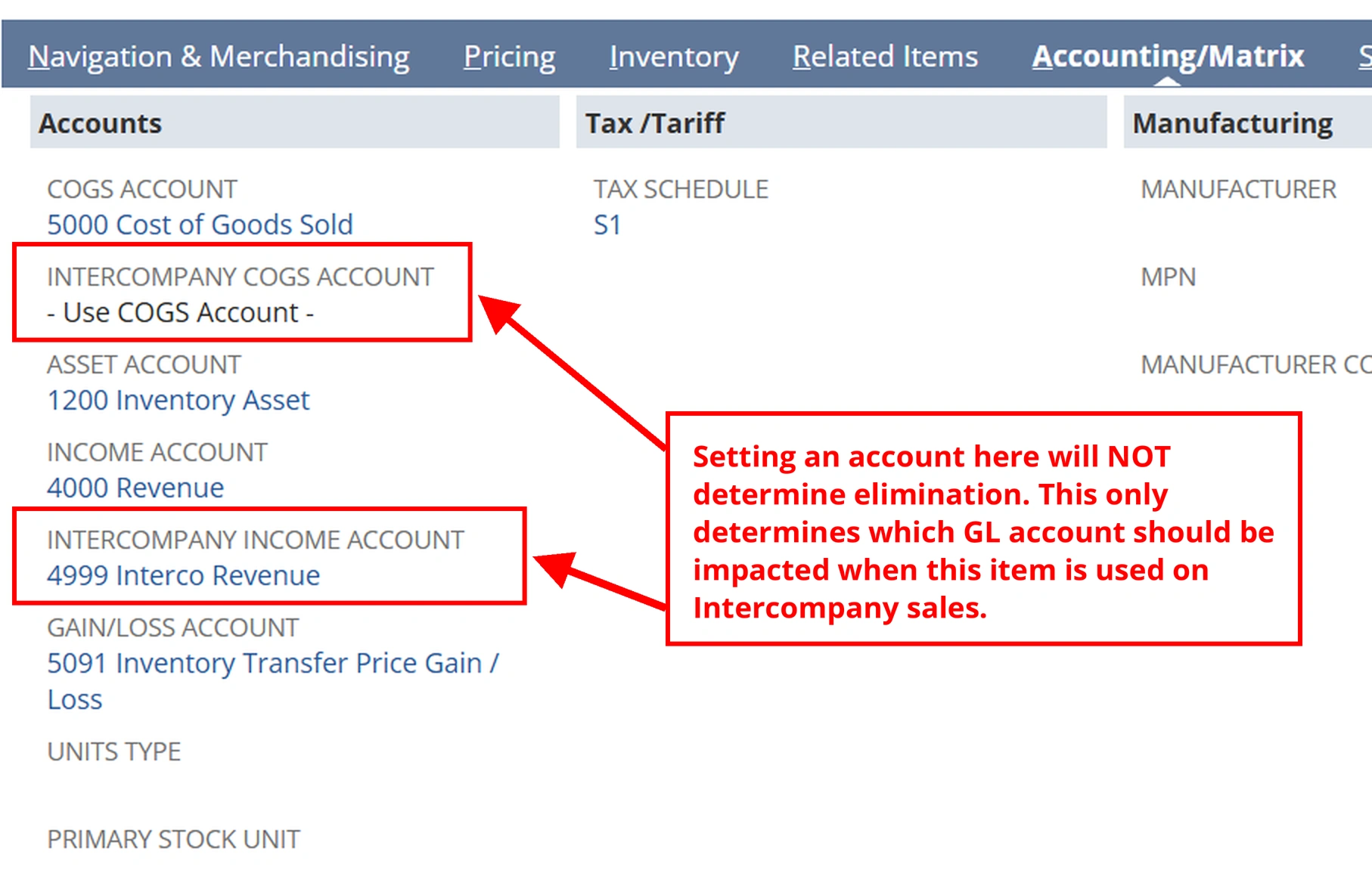
It’s worth noting that there are fields on item records that may lead a user to think that they drive elimination, but in reality they do not. “Intercompany COGS Account” and “Intercompany Income Account” simply indicate which GL Account should be impacted by the item on intercompany sales transactions. If that account is not flagged to “eliminate intercompany transactions”, then the revenue or COGS will not eliminate. Conversely, even if no GL account is specified in these fields (which then would default to the general COGS and Income accounts), if the general income or COGS account is flagged to eliminate, then the impacts to these accounts from intercompany sales transactions will eliminate.
In short, Intercompany fields on item records drive which specific GL account is impacted, while the question of elimination is driven by general elimination logic as summarized above (combination of logic of elimination flag on account record and entity type, ultimately driving the eliminate flag on transaction lines).
Custom Transaction Type “Styles” and Their Impact on Elimination Treatment
What the Style of a Custom Transaction Type Changes
Custom transaction types add one more layer, because the style chosen on the type record (Journal, Sales, Purchase) shapes how lines post. Before relying on automatic elimination for a custom type, test each style you use in a sandbox:
- Post a test transaction with a representing entity to a flagged account that is not A/R or A/P.
- Post a second test with a non-representing entity to the same account.
- Query the line-level Eliminate flag on both and compare the results.
In my previous testing, I found that the Sales style and Purchase style transactions behaved similarly to customer invoices and vendor bills: the header-level entity was instrumental in how NetSuite decided whether to flag the transaction lines with the “Eliminate” flag. When it came to the Journal-style custom transaction types, I found an interesting phenomenon. Although the “Eliminate” field was not available in the UI, adding a “representing entity” in the native “Name” field on the transaction line had the same effect that the header entity did on typical sales or purchase transactions.
Frequently Asked Questions
Why didn’t my NetSuite intercompany transaction eliminate?
Start with the line-level “Eliminate” flag. If it is false, NetSuite will not create an elimination journal for that line (intercompany inventory COGS is the one exception). The field is not available in Saved Searches, so use a SuiteQL query to inspect it.
Does checking “Eliminate Intercompany Transactions” on an account guarantee elimination?
Only on A/R and A/P accounts, where it requires the line flag and a representing entity. On every other account type, it only permits the line to be flagged; the transaction still has to set it.
Do the Intercompany COGS and Income Account fields on the NetSuite item record control elimination?
No. They choose which GL account an intercompany sale posts to. Whether that line eliminates depends on the account’s elimination setting and the entity on the transaction.
How do NetSuite custom transaction types decide whether to eliminate?
In our testing, Sales and Purchase styles follow the header entity, like invoices and vendor bills. Journal styles respond to a representing entity in the line’s “Name” field, even though the “Eliminate” field is not shown. Test each style you use in a sandbox before relying on it.
Why does a NetSuite intercompany balance change from month to month with no new activity?
Usually currency translation. Make corrections in the source subsidiary, in the source currency.
Previous Articles for Further Research
See also:
- 2022: Reconcile NetSuite Auto-Elimination Amounts
- 2023: Intercompany Account Balance Troubleshooting
- 2025: Learn the Hidden Mechanics Behind NetSuite’s Consolidated Financial Reports
- 2026: NetSuite Multi-Entity at Scale: Extending Beyond Subsidiaries
Conclusion
NetSuite intercompany elimination is predictable once you know where to look. The line-level “Eliminate” flag decides the outcome. The account record’s setting and the entity on the transaction decide how that flag gets set, and item record intercompany accounts only choose where amounts post. When a balance fails to eliminate, inspect the line flag first, and test each custom transaction style in a sandbox before relying on it at period close.
If this article resonates, consider subscribing to receive notifications for new posts. If you are prepared to address your NetSuite intercompany elimination and consolidation challenges, let’s have a conversation.