


This article is relevant if your NetSuite account contains older scripts and you want to understand Oracle’s SuiteScript 2.1 requirement, organize responsibilities, and use the transition to improve your business systems.
TL;DR Summary
Oracle has published a phased transition ending in NetSuite 2028.2, when legacy scripts will no longer run. We built the Prolecto Script Upgrade Planner to help organizations measure their exposure, identify responsibility, and plan. Starting now gives business leaders more choices than simply rewriting everything.
Background: Technical Debt Now Has a Date
NetSuite’s recent announcement changes the conversation about maintaining customizations. In my experience working with the platform, this is an unprecedented requirement to bring the installed scripting estate to a common specification.
Oracle’s published timeline includes three important milestones:
| Release | Planned change |
|---|---|
| 2027.1 | SuiteScript 1.0 support narrows to critical issues. Other problems require conversion first. |
| 2028.1 | SuiteScript 2.0/2.x scripts run as 2.1 by default; 1.0 cannot be deployed in new accounts. |
| 2028.2 | All new and existing scripts must use 2.1; legacy versions no longer run. |
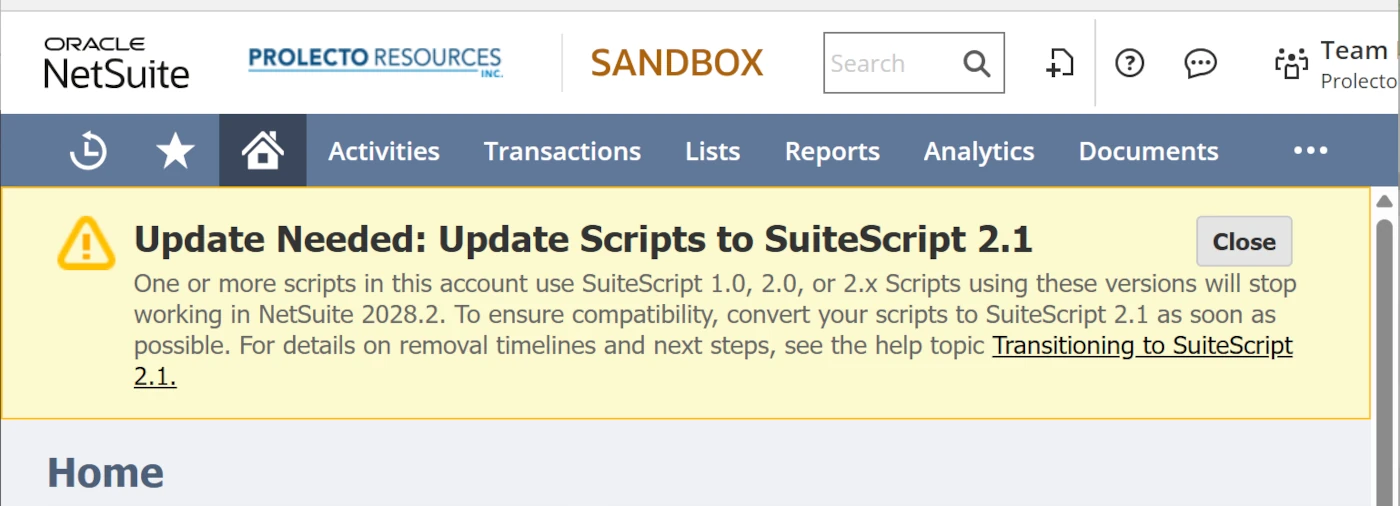
There is time to act. Yet important work with a distant deadline is easy to neglect. Hoping Oracle extends the timetable is a gamble, not a plan.
In my January 2025 article, Best Practices for Addressing NetSuite’s Easily Accumulated Technical Debt, I explored how layered customizations, uncoordinated enhancements, and add-in applications accumulate hidden maintenance costs. Those costs constrain adaptability and erode user trust. Visibility tools help, but business systems leadership, documentation, controlled change, and regular architectural review remain essential.
This announcement makes that obligation concrete.
NetSuite Technical Debt Is a Responsibility of Ownership
I view this transition as technical debt coming due. That does not mean an older script was poorly conceived. A useful enhancement can serve faithfully for years while carrying a future modernization obligation. And with no pressure to change, it was easy to keep it out of mind.
Think of these obligations as “off-balance-sheet” liabilities in a management sense. They may receive little attention until a platform change demands payment.
The code can originate with your own team, an implementation partner, an add-in publisher, or Oracle’s own platform enhancements. Those origins matter. Some work belongs to your organization; other work requires a publisher’s release and your team’s validation.
Business leaders need to understand that distinction before considering and approving a migration budget.
Introducing the Prolecto Script Upgrade Planner
We built the Prolecto Script Upgrade Planner as a SuiteApp for the first phase: diagnosis.
My vision was a utility that remains quietly in the account, cataloging concerns and preserving progress. An initial inventory is useful; an ongoing record of evidence and decisions is more valuable.
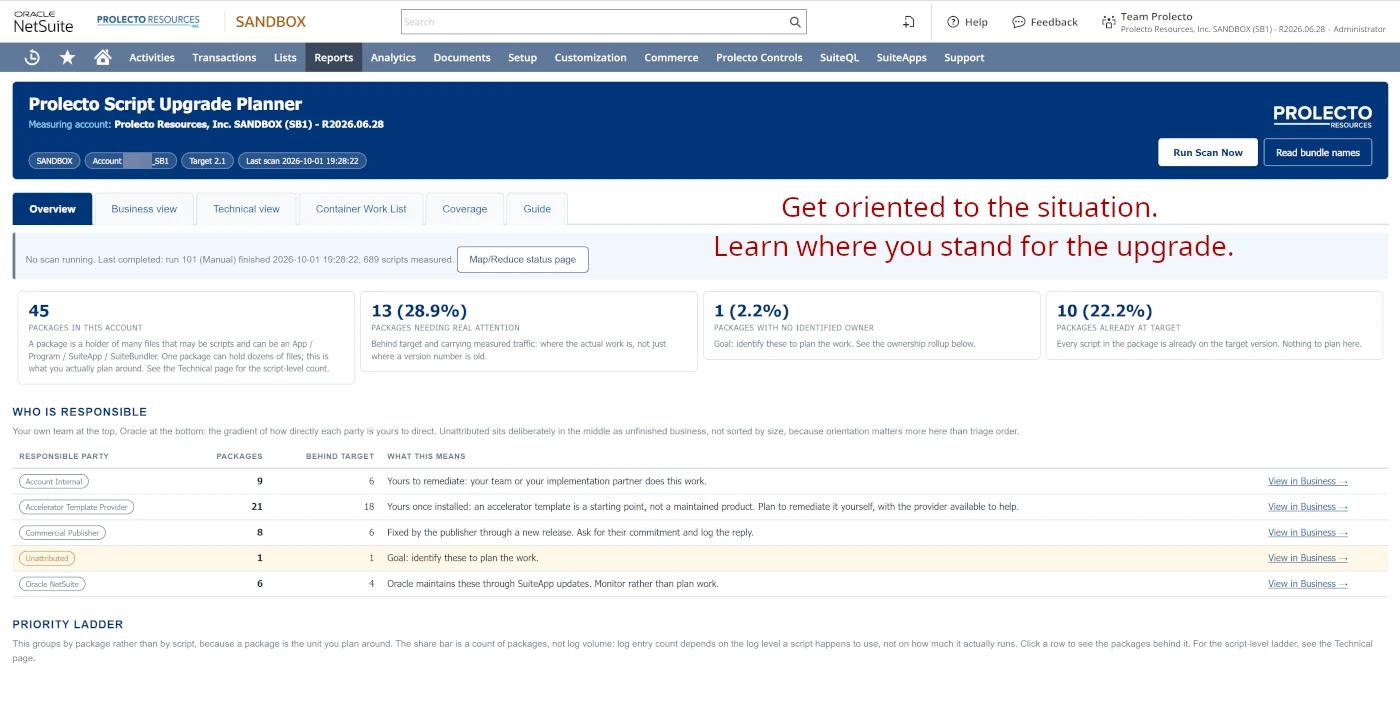
Measure, Attribute, and Plan
The Planner organizes the challenge through five connected capabilities:
- Establish the inventory: Catalog script records, deployments, versions, files, and the bundles, SuiteApps, or folders that contain them. Group records sharing a file so effort is assessed against the underlying code.
- Find evidence of activity: Inspect execution logs, active days, and relevant business-record activity. Prioritize older code with measured activity while exposing coverage gaps. Quiet logs do not prove a script is unused.
- Clarify responsibility: Organize packages by account ownership, template provider, commercial publisher, or Oracle. Flag uncertain attribution for confirmation. Installed templates may be your responsibility to maintain; maintained products generally require publisher updates.
- Inspect potential record impact: Analyze readable source for recognizable record operations and dependencies. These findings help scope investigation and testing; they are source call sites, not measured execution counts or a complete map of every access path.
- Keep decisions and progress visible: Record dispositions, owners, dates, successors, and journal entries. Scheduled scans preserve snapshots and detect changes. PDF diagnostics provide executive, package, or detailed views for different audiences.
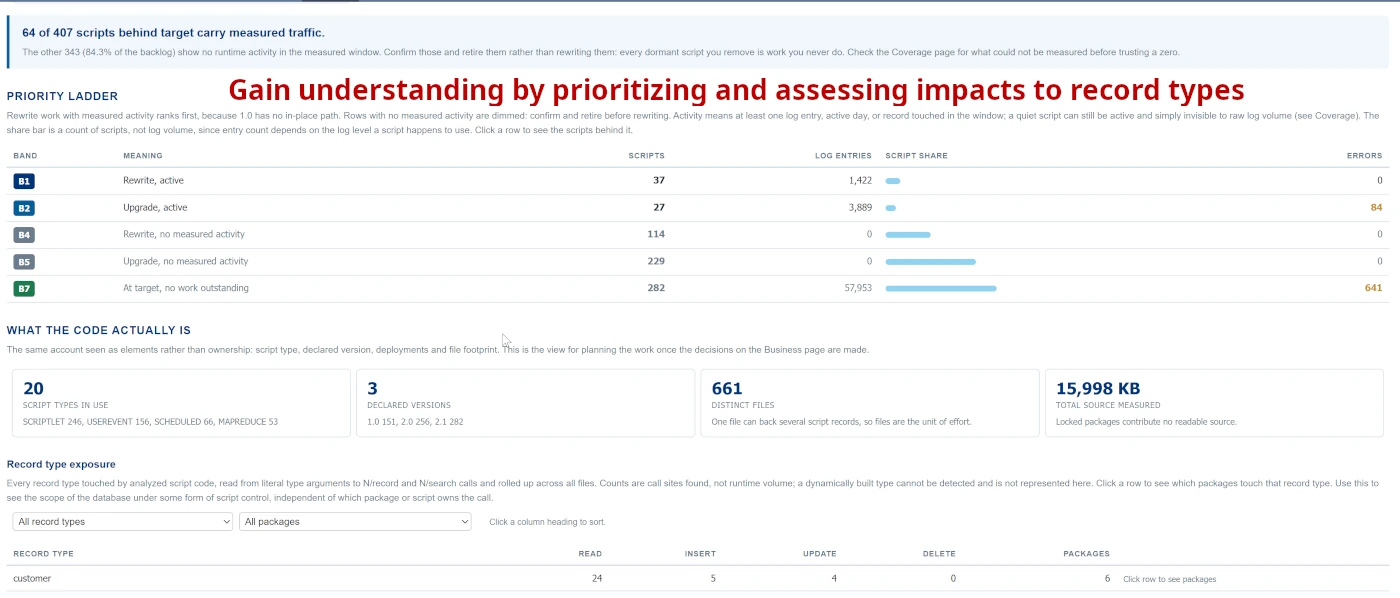
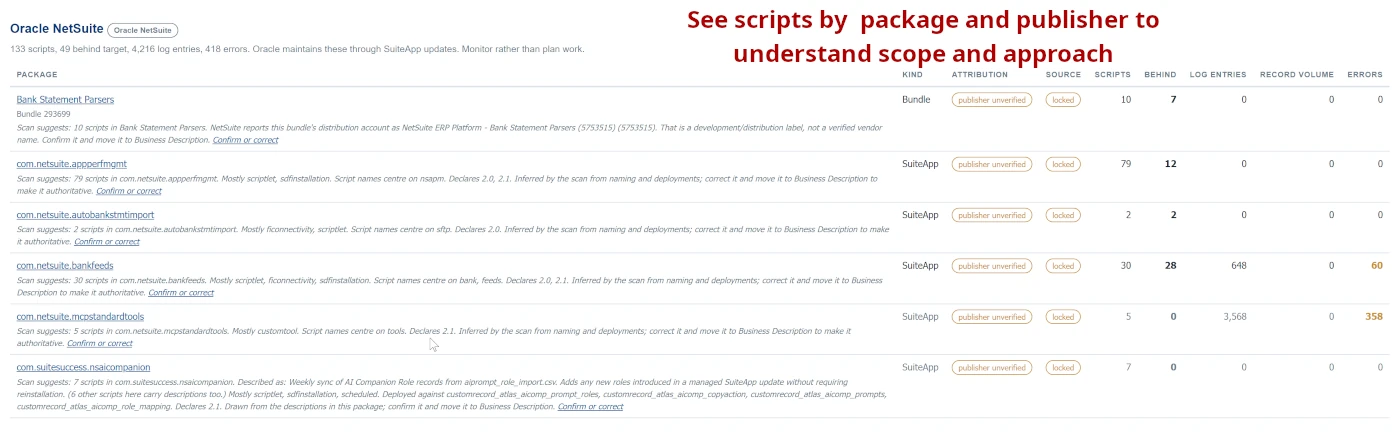
The Planner inspects the configuration and writes its own planning records. It does not modify your scripts or business records, and it does not perform migration or testing for you. We have built other utilities to support the upgrade effort — and AI advancements have certainly reduced the required investment.
Ask Better Questions Through MCP
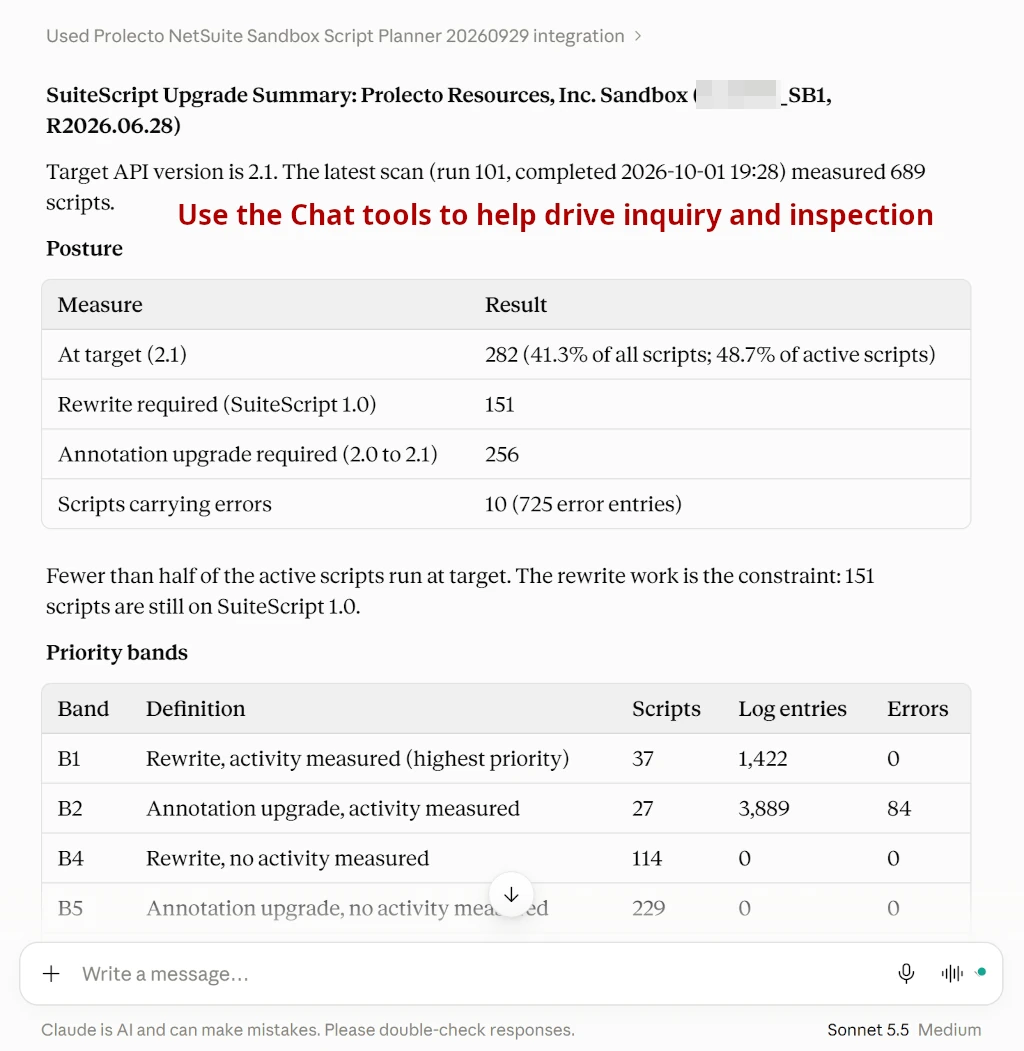
We also exposed the findings through Model Context Protocol (MCP), allowing connected ChatGPT and Claude tools to help investigate the account.
For example: “Which publishers have active scripts behind target?” or “What changed since our last review?”
The tools are read-only by default, with an optional administrator-enabled journal-note action. The assistant works from the Planner’s evidence; business judgment remains with the people responsible for the account. We supply a NetSuite role that is effectively read-only and can be tailored for use with the chat tools.
Use the NetSuite Transition to Create Business Value
Using AI tools to help with conversion is only one possible response. Before investing, ask whether the enhancement still serves the business. The right course may be to retire obsolete logic, complete an unfinished replacement, consolidate overlapping applications, adopt newer native capabilities, or redesign a process that has outgrown its original solution.
SuiteScript 1.0 generally requires rewriting or replacement. Moving 2.0 / 2.x to 2.1 can be simpler, but runtime differences still require compatibility review and regression testing.
We are preparing to work with interested clients to understand their obligations and refine the Planner through practical use. In due course, we intend to make it available to the community without a license charge.
At Prolecto, our Architecture, Accounting, Operations, and Technology practices connect this work to business priorities. Thoughtful leadership turns uncertainty into an organized program and gives organizations room to improve.
If you found this relevant, subscribe to new articles. If you are ready to understand your SuiteScript obligations and build a grounded plan, let’s have a conversation.










