

Get clarity on hard-to-find NetSuite elimination entry sources to ease consolidation
Consolidation and Elimination Entries
NetSuite OneWorld offers some really powerful tools to make consolidated reporting simple. A key feature offered is the “Automate Elimination Entries” tool. The concept is straightforward: Intercompany transactions that occur during the period are “flagged” for eventual elimination, and at month end, when initiated, NetSuite will find all transaction lines that have been flagged, and reverse the impact of these transaction lines to a designated “Elimination” Subsidiary by booking special Journal Entries automatically.
AI Summary:
NetSuite auto-elimination reverses flagged transaction lines into elimination subsidiaries, but some entries carry no link back to their sources and the native report only traces one direction. The eliminate flag is reachable in SuiteQL, enabling a query that shows everything that should eliminate for comparison against what posted.
Trace Elimination Entries to Source Transactions
Automatically-generated Elimination entries in most instances get tagged on each line with a link back to the source transaction.
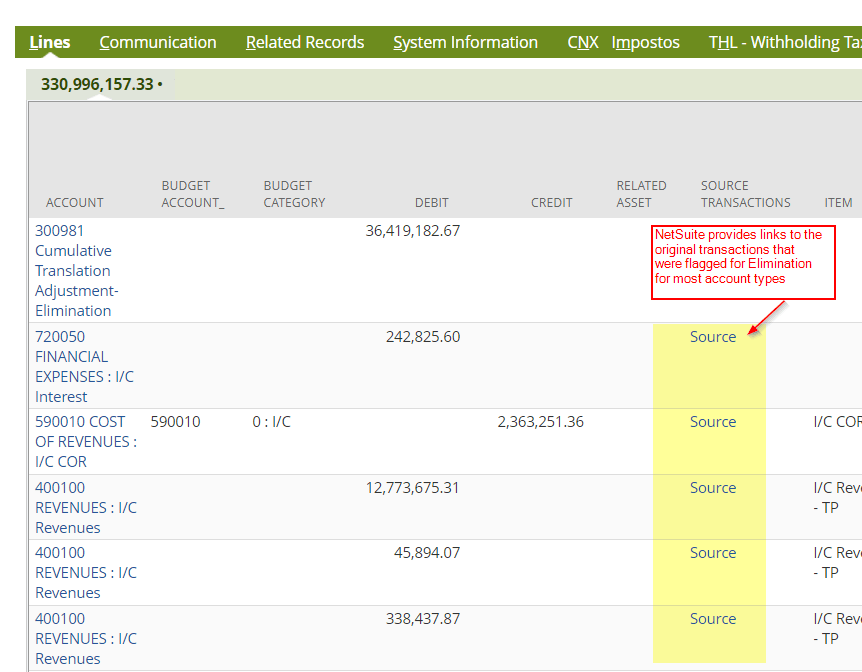
These links to the source transaction are in the form of URLs that when clicked, open up new transaction windows as popups. It is not currently possible to reach the “source” transactions from Elimination Journal Entries in Saved Searches or SuiteQL Queries, though the field is available via script as can be seen below (hat tip to Michoel Chaikin for his useful NetSuite Field Explorer).
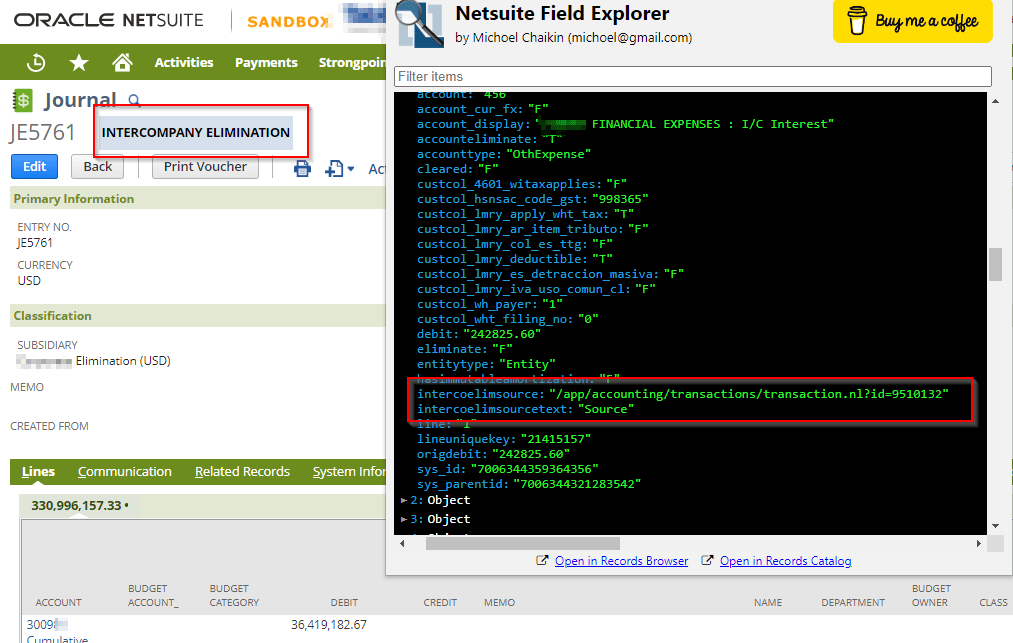
NetSuite Elimination Entries missing “Source”
Although, as mentioned, the Source transactions cannot be accessed via Saved Search or Query, there is a native report that shows detail from the source transactions. It is called “Intercompany Elimination” and can be accessed via Reports > Financial. However, there are some Elimination Entries that will not get tagged with a “source” transaction and will likewise not appear on the native “Intercompany Elimination” report. This is documented in SuiteAnswers article 34241 and in SuiteAnswers article 106926. As stated in those articles, Balance Sheet accounts other than Accounts Receivable and Accounts Payable (and Equity – not mentioned in the article) will not have a link to the source transactions on the Elimination Journals. This means that for these types of accounts, it is even more difficult to reconcile transactions that should have eliminated and what actually posted automatically to the Elimination Subsidiaries.
Additionally, it is difficult to properly reconcile amounts even those in accounts that do get tagged with “Source”, since the native “Intercompany Elimination” report only goes one way – it shows the Intercompany Elimination entries that were auto-created, and traces back to the original source transactions. There doesn’t seem to be a standard way to start with entries subject to elimination and test whether they were all successfully eliminated.
“Eliminate” flag on transactions
Although I mentioned above that the “source” field cannot be accessed via SuiteQL queries, there is a way to find the “sources” of Elimination Journal Entries, and even when there is no “source” link as described above. There is a field called “eliminate” on all NS transactions, though it often is hidden on the forms. This field is a checkbox that drives the Automatic Elimination process. If we can search all transactions that have this flag checked, we can see the amounts that should have eliminated, and that can be a basis of comparison to the actual eliminated amounts.
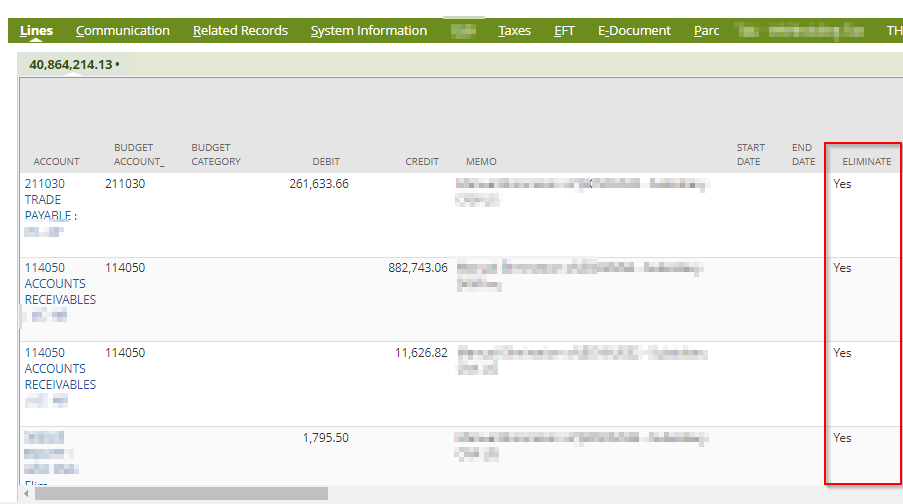
SuiteQL Strikes Again!
Although the Eliminate flag is not available in Saved Search, it is available in SuiteQL queries. SuiteQL is a rapidly growing resource for reporting in NetSuite, and several tools have emerged to help the user create reports that have depth and breadth in the database. See my previous articles that discuss ways that SuiteQL can be leveraged. See also Marty Zigman‘s blog article about a custom “renderer” tool that greatly expands the use of this type of reporting.
Here is a sample basic Query that shows transactions that are flagged for Elimination. Carefully note the “FROM” argument and the way the Joins are built; this is the way to bring together all of the elements of a transaction. Also note that the Elimination flag is “tl.eliminate”, which means that the field lives in the transactionLine table (tl is the alias for that table):
SELECT
t.type
,BUILTIN.DF(t.tranid) transaction
,t.trandate
,tl.eliminate
,BUILTIN.DF(tl.subsidiary) subsidiary
,tal.account account_internal_id
,BUILTIN.DF(tal.account) account
,tal.amount
,tal.debit
,tal.credit
,tal.exchangerate
,BUILTIN.DF(t.currency) currency
,BUILTIN.DF(tl.entity) name
,t.createddate
FROM
transaction t INNER JOIN transactionline tl ON t.id = tl.transaction INNER JOIN transactionaccountingline tal ON tal.transaction = t.id AND tal.transactionline = tl.id INNER JOIN subsidiary s ON s.id = tl.subsidiaryWHERE
tl.eliminate = 'T'
AND
t.trandate <= '06/30/2022'
ORDER BY
BUILTIN.DF(tl.subsidiary)
,t.id DESC
Conclusion
I have found that the above query gives the most value when viewed with and compared to other reports, such as the “Intercompany Elimination” report described above, or supplementary saved searches, such as the one suggested in SuiteAnswers article 34241.
NetSuite knowledge tends to build on itself. A whole world of reporting possibilities opened up once I learned the SQL reporting techniques in NetSuite. If you would like to hear more about expanding your analytics horizons, please reach out!
Frequently Asked Questions
How does NetSuite know which transactions to auto-eliminate?
Every transaction line carries an eliminate checkbox, though it is often hidden on forms. At period end the elimination process finds the flagged lines and reverses their impact into the elimination subsidiary through automatic journal entries.
How can I find all transactions flagged for elimination?
The eliminate field is not available in saved searches, but it is available in SuiteQL as tl.eliminate on the transactionLine table. A query on that field shows everything that should eliminate, which you can then compare to what actually posted.